We Looked Everywhere for a Keyboard Competitor to Copy, and Came Up Empty
When we started building UnimeType, we did what every small software team does on day one: we opened app stores and search engines to see whose homework we could study. Keyboards are a twenty-year-old category dominated by OS giants and surrounded by hundreds of indie utilities. Surely someone had already built what we wanted. Yet after installing every keyboard and input-switching plugin we could name and lining them up in a spreadsheet, we stared at an unexpected conclusion: nothing on the market was actually doing the same job.
The daily annoyance we wanted to fix was completely ordinary. Almost everyone we knew who worked across a native language and English tripped over the exact same friction several times an hour. A designer replies to feedback in Slack or WhatsApp, switches back to Figma, presses V for the move tool, and gets a Pinyin or Kana candidate popup in the corner of the canvas instead. A grad student checks numbers in a group chat, jumps back into Overleaf to type \cite{}, and watches the backslash turn into full-width punctuation. A merchandiser quotes $18.5 in WhatsApp and Excel on one monitor while messaging a local supplier on the other, dropping a hollow full-width period into a spreadsheet formula. Even gamers alt-tabbing out to answer one message come back to find WASD hijacked by an input bar. And inside a single chat message mixing a native language with English terms like team and onboarding, your thumb or left pinky still bounces across Shift or the Globe key multiple times mid-sentence.
At first, we assumed traditional transliteration keyboards had solved this years ago. Google Input Tools, Google Japanese Input (Mozc), Yamli for Arabizi, Russian phonetic layouts, and built-in Pinyin, Romaji, and Hinglish keyboards all turn the twenty-six English keys into native scripts.
Test them on real bilingual messages, though, and every traditional transliteration IME enforces the same rule: every two or three letters you type, a live candidate bar pops up and demands a word-by-word decision. That works fine inside a pure monolingual paragraph. Drop two English words into the middle of a sentence, and a character-by-character engine has zero visibility into the second half of your thought. Type ni or main, and the engine cannot tell yet whether you want a Chinese character, a Japanese particle, a Hindi pronoun, or the English word main, chewing English product terms into garbled homophones. Meanwhile, Gboard and Apple's "no-switch bilingual typing" genuinely retires the Globe key for Latin-script pairs like English + Spanish or English + French, yet walls off separate panels the instant your pair crosses into Chinese, Japanese, Arabic, or Hindi.
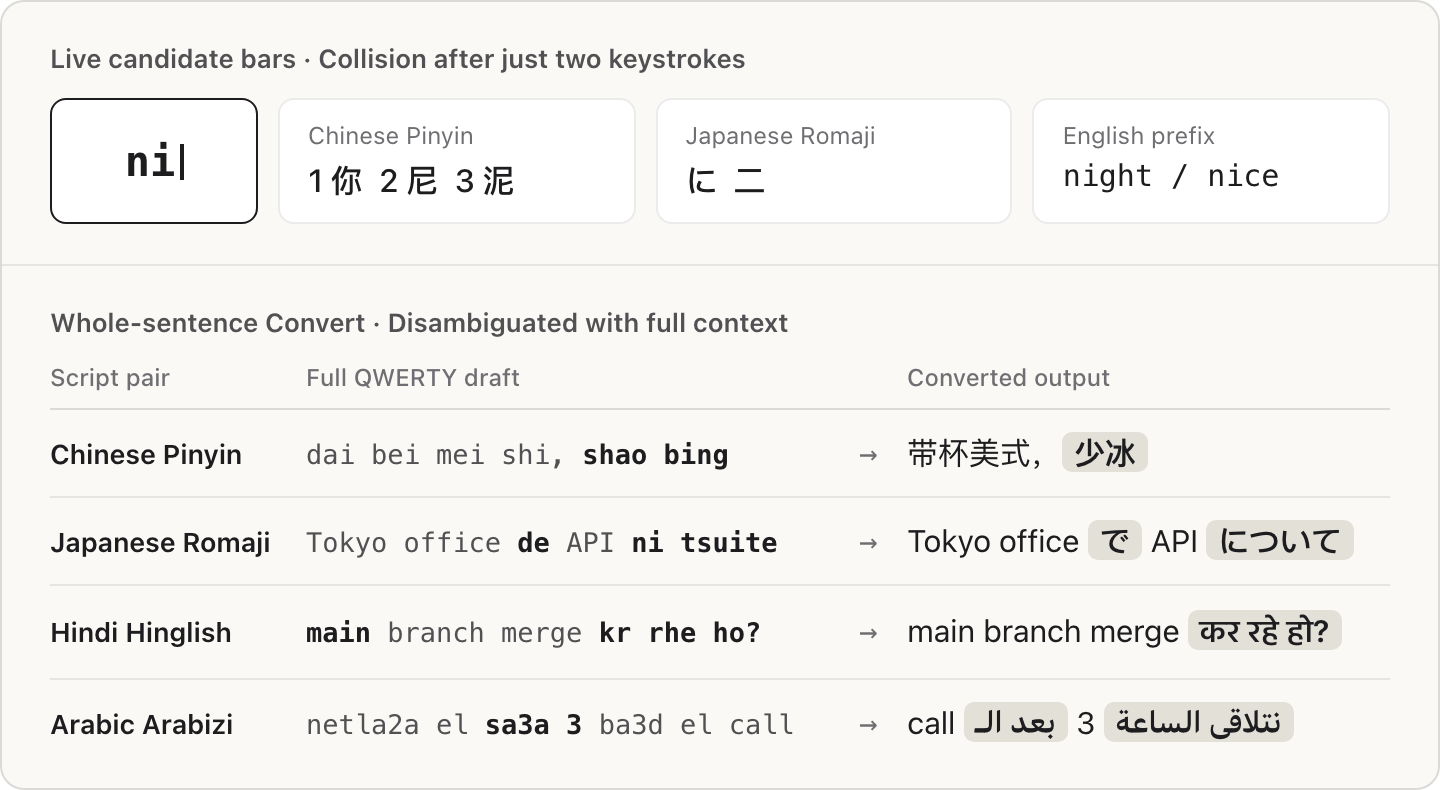
Once we ruled out traditional IMEs, we checked three adjacent tool categories. Per-window utilities on Mac like Input Source Pro automatically switch input sources when you change apps—saving your single-key shortcuts in Figma and WASD keys in games—yet they only see window borders and cannot help inside a single chat box where half the sentence is phonetic and half is English. AI writing keyboards like Grammarly and SwiftKey polish English text that is already on screen without converting phonetic drafts into another script. And live translation bars in Gboard or a separate ChatGPT tab flatten the entire sentence into one language, wiping out English API names, product terms, or a local station name like 渋谷駅 West Exit that a visiting colleague actually needs to show a taxi driver.
Crossing those categories off one by one made the empty space in the middle obvious.
All we wanted was a keyboard that stays on plain, predictable twenty-six-key English QWERTY all day, with no live pre-edit popup stealing single-key shortcuts or half-width punctuation. When you jump into Slack or WhatsApp to send a bilingual message, you type the phonetic words and the real English terms straight through in one pass—say mingtian xiawu he team guo yixia onboarding or kal subah Q3 budget bhej dena, Figma update ho gaya hai. Nothing pops up while you type. Press Convert once at the end, and full-sentence context resolves homophones cleanly while keeping team, onboarding, Q3 budget, and Figma untouched in English (details on each supported pair are in Input languages).
With nobody's homework left to copy, we built that workflow from scratch. Having no direct competitor certainly does not mean UnimeType replaces every input tool on your machine: whenever a passage is packed with rare characters or obscure proper names where visually scanning a live candidate list helps, we switch back to a traditional candidate-bar IME ourselves. We built UnimeType strictly for the seam where bilingual people spend the rest of their day—bouncing across ten app windows and mixing two scripts in the same breath. Try typing a couple of everyday lines on the Bilingual keyboard page to feel the difference under your own fingers.
Download UnimeTypeiOS, Android, macOS, Windows, Linux, and ChromeOS
View downloadsNext: Three Ways People Try to Type Without Switching Keyboards (And Where Each Breaks)