
UnimeType vs. Google Input Tools: Beyond the Chrome Extension and Spacebar Trap
UnimeType is a native desktop and mobile alternative to Google Input Tools for bilingual typists. Google Input Tools pioneered phonetic transliteration in the browser, yet its standalone Windows desktop app was discontinued years ago and its Chrome extension converts every word the moment you hit Space, turning everyday English words like main gate, Figma, Excel, and Flat White into phonetic Devanagari, Arabic, or Cyrillic.
From Chrome-only spacebar commits to system-wide Convert
Today Google Input Tools lives primarily inside Chrome browser tabs and its web demo, whereas UnimeType installs as a native system input method on macOS, Windows (via Microsoft Store or signed x64/ARM64 installers), and Linux (beta), a ChromeOS input method on the Chrome Web Store, a system keyboard on iPhone, iPad, and Android, plus no-login browser converters under /tools/*.
The deeper difference is timing: Google Input Tools converts the preceding token every time you press Spacebar, requiring manual number-row candidate picking on homographs (such as Hindi "main" vs. English "main gate", or Pinyin "shao bing"). UnimeType stays silent while you draft in plain ASCII and resolves both homographs and English spans from full-sentence context when you press Convert.
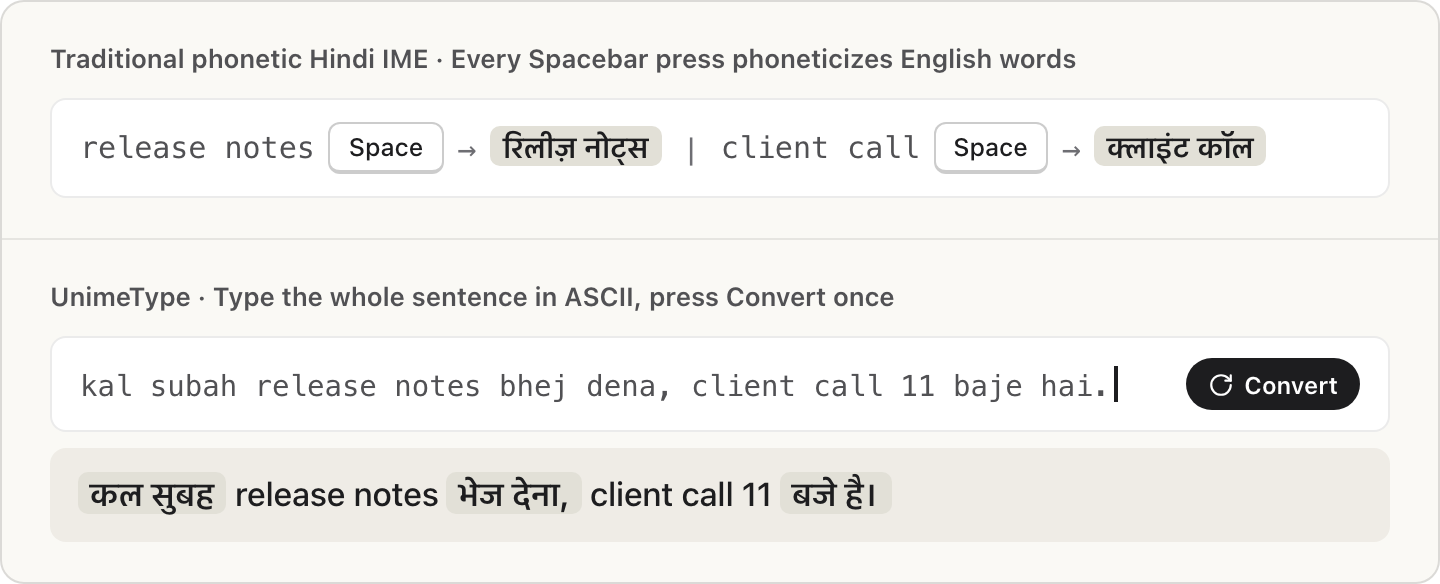
Why spacebar-triggered phonetic IMEs break multi-app daily life
When Google Input Tools launched, most people typed monolingual emails inside Gmail in a desktop browser. Today, people chat and work across native WhatsApp, WeChat, Discord, Figma, Excel, Overleaf, and mobile apps—and almost every sentence mixes native grammar with English words.
Because Google Input Tools commits on every spacebar press, typing "main abhi cab me hoon, 7pm tak main gate ke paas milte hain" forces multiple Ctrl+G toggles or turns "main gate" and "cab" into Devanagari. UnimeType lets you finish the sentence in plain ASCII and converts the whole thought in one pass.
When Google Input Tools still makes sense
Google Input Tools remains a handy, zero-login Chrome extension when you work exclusively inside Chrome tabs and need monolingual phonetic input for scripts outside UnimeType’s current lineup (such as Amharic, Sinhala, Kannada, or Malayalam).
If you want a quick browser tab with no install and want English words preserved automatically, bookmark UnimeType’s free online converters (/tools/english-to-hindi, /tools/arabizi-to-arabic, /tools/pinyin-to-chinese, and /tools/translit-to-cyrillic).
Common questions
Is there a free browser version of UnimeType like Google Input Tools Try?
Yes. Every supported UnimeType language has a free no-login browser converter under unimetype.com/tools/ (including Pinyin, Hinglish, Romaji, Arabizi, Russian Translit, Vietnamese, Greeklish, and five European accent restorers).
Does UnimeType work inside native desktop apps like Slack, Notion, and WeChat?
Yes. UnimeType installs as a native system input method on macOS, Windows (Microsoft Store and x64/ARM64 installers), Linux (beta), and ChromeOS (Chrome Web Store), as well as a system keyboard on iPhone, iPad, and Android.