Google Input Tools for Desktop Is Gone: Four Safe Ways to Type Phonetically on Windows and Mac in 2026
Hundreds of thousands of people still search every month for a Google Input Tools Windows offline installer, only to land on seven-year-old blog posts hosting unsigned .exe archives on third-party download mirrors.
Google quietly retired the standalone Windows desktop version of Google Input Tools years ago. Running decade-old installers pulled from unofficial file hosts on a modern Windows 11 work laptop is both a security hazard and an IT compliance headache—and macOS never had an official Google Input Tools desktop package outside Japanese in the first place. Depending on where you type and whether your sentences mix English words with native script, here are the four safe, maintained options available in 2026.
1. Official Google Input Tools Chrome Extension (Browser Tabs Only)
Google never shut down the web engine itself—only the OS-wide desktop client. If 90% of your typing happens inside Gmail, Google Docs, or web WhatsApp inside Chrome, you can still install the official extension or type directly on Google's Input Tools web tryout page.
The boundary is strictly the browser frame. The moment you Alt + Tab into desktop Slack, Microsoft Word, Excel, Figma, Notion's desktop app, or VS Code, the Chrome extension disappears, forcing you either to copy-paste sentences out of a browser tab or maintain a second desktop IME anyway.
2. Built-In Windows 11 and macOS Phonetic Keyboards
Both Microsoft and Apple absorbed phonetic transliteration directly into their operating systems over the past few releases, meaning you do not need any external download for basic single-script phonetic typing:
- Windows 11: Open Settings → Time & language → Language & region, add Hindi, Tamil, Marathi, Arabic, Russian, or Chinese, click Language options → Add a keyboard, and pick the Phonetic layout (such as Hindi Phonetic), documented in Microsoft's Windows keyboard layout guide.
- macOS: Open System Settings → Keyboard → Input Sources →
+and add built-in Hindi – Transliteration, Pinyin, Japanese – Romaji, or Russian – Phonetic.
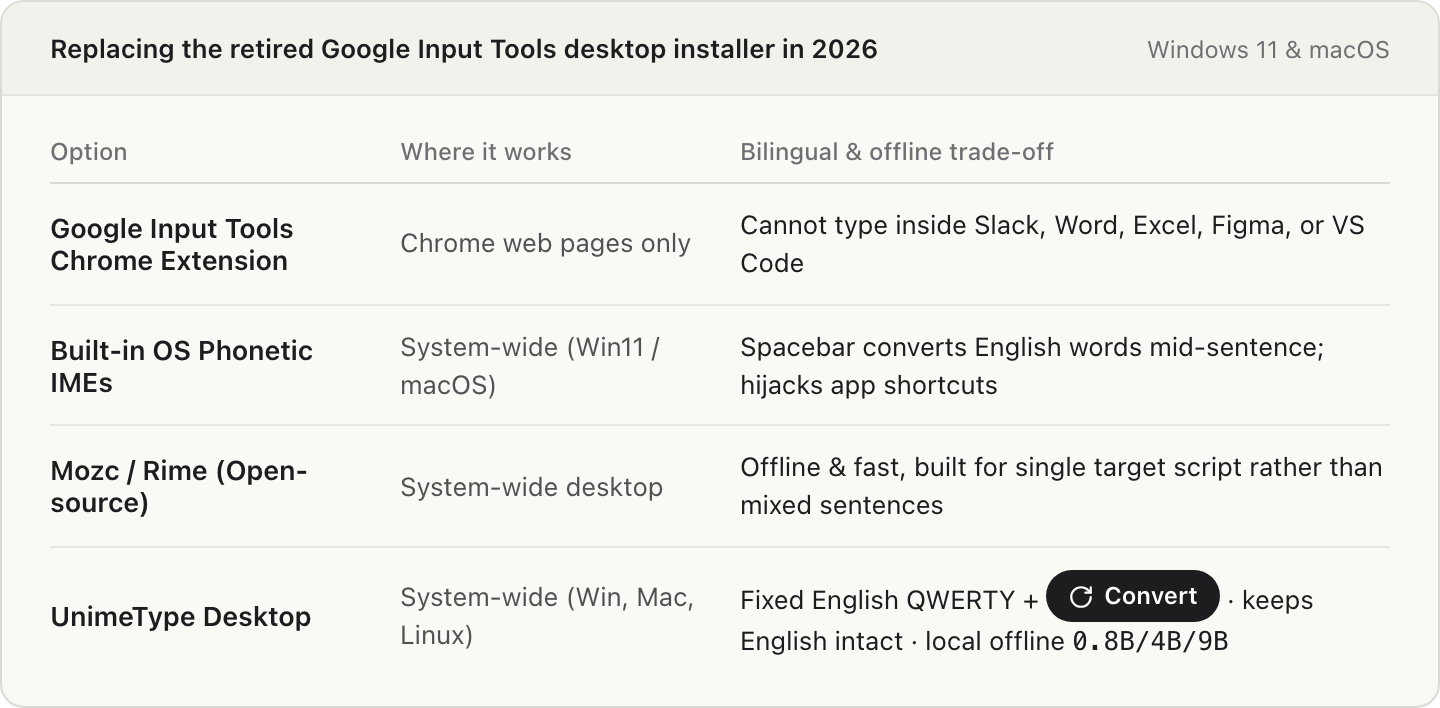
Built-in OS phonetic keyboards work offline out of the box, yet they inherit a classic live-IME flaw as soon as you write the way bilingual teams actually talk. Because every press of the Space bar commits the top native-script candidate immediately, typing a natural mixed message like kal afternoon team call ke baad Q3 deck bhejta hu turns English words like team, call, and deck into Devanagari phonetics unless you constantly toggle layouts mid-sentence (we examined this exact collision in Hinglish typing without corrupting English words). Leaving a phonetic IME active also hijacks single-key shortcuts when you switch back to Figma, Excel, or games.
3. Open-Source Mozc and Rime for Single-Script Power Users
One common source of confusion: while multi-language Google Input Tools for desktop was discontinued, Google Japanese Input lives on actively, along with its open-source engine Mozc across Linux, Windows, and macOS builds. Likewise, Chinese keyboard tinkerers can run Rime (Weasel on Windows, Squirrel on macOS) completely offline with custom YAML schemas.
Both are fast, local, and respected engineering projects if you type primarily in one target script and enjoy tuning dictionaries. Neither was designed to convert mixed bilingual sentences across Hindi, Arabic, Chinese, Japanese, and European languages while keeping your daily desktop permanently in clean US ASCII.
4. System-Wide Fixed QWERTY + Offline-Capable Convert (UnimeType)
We built UnimeType for the exact workflow the old Google Input Tools desktop app hinted at—typing your native language phonetically on an English keyboard inside any desktop window—without the live candidate bar mangling English words or stealing app shortcuts.
On Windows 11, macOS, and Linux, UnimeType keeps your system input locked to pure English QWERTY across Slack, Word, Excel, Figma, Overleaf, and VS Code. When you type a bilingual line in any app:
kal afternoon team call ke baad Q3 deck share karta hu
you type the whole thought straight through without watching popups, then press Convert once (Caps Lock or Alt / Option + Enter, configurable in setup and shortcuts). UnimeType converts the Hindi words into कल afternoon team call के बाद Q3 deck share करता हूँ while preserving every English term in Latin script (also see our side-by-side notes on UnimeType vs. Google Input Tools).
For desktop users who specifically searched for an offline installer because of strict privacy rules or air-gapped work, UnimeType's desktop client connects directly to LM Studio, Ollama, or llama-server so you can run our open-weight 0.8B, 4B, or 9B transliteration models 100% locally offline with zero cloud traffic (and in cloud mode, ordinary typing sends 0 Bytes while on-demand requests mask secrets locally under zero-retention rules—see privacy and protected content). Skip the decade-old .exe mirrors: pick Windows/macOS built-in phonetic layouts for pure single-script paragraphs, or pair one fixed English layout with on-demand Convert when your workday mixes two languages across every app.
Download UnimeTypeiOS, Android, macOS, Windows, Linux, and ChromeOS
View downloadsNext: You Already Know What You Want to Say. Why Check Your Keyboard State First?