You Already Know What You Want to Say. Why Check Your Keyboard State First?
People often assume UnimeType is built for typing-speed nerds chasing another ten words per minute. It isn't. If you write in one language all year, the keyboard that shipped with your phone or laptop is already fast enough, and years of muscle memory are on its side. We built this for people who live and work across two languages every day, and keep losing a half-second before the first keystroke just checking what state their keyboard was left in.
Right now, judging honestly from what the product handles best today rather than claiming some massive telemetry study, the clearest fit is everyday bilingual life. International students texting housemates, expats messaging family, and teammates on cross-border Slack or WhatsApp channels constantly fold names, neighborhood spots, and English work terms into the same breath. Typing "Acabo de revisar el brief con Alex, manana vamos al café en Soho?" or dropping a local restaurant name into an English message isn't an affectation. It is just how bilingual people talk when nobody interrupts them.
Operating systems, though, treat every script boundary like a mode change. As Apple's macOS input-source settings assume, mixing two scripts or pulling accented characters usually means cycling layouts, hunting dead keys, or fighting a live candidate bar mid-sentence. A single thought comes out on screen in four pieces. For this group, Convert alone carries the whole pitch: leave your keyboard on plain English QWERTY all day, type the sentence straight through the way it sounds in your head, and tap once at the end. Phonetic syllables and missing accents resolve in place; names, venues, and English terms stay untouched.
The second group shows up at work, wherever someone spends the day writing in a second language to overseas colleagues on Slack or clients over WhatsApp and email. There, getting the letters onto the screen is only half the job.
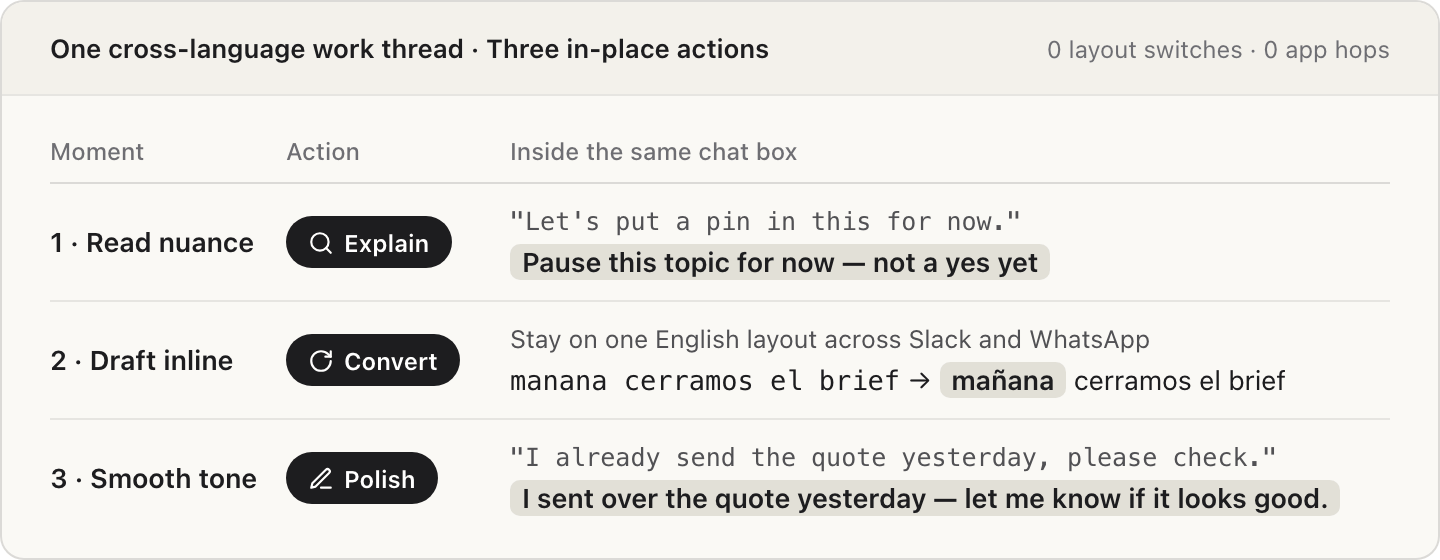
A client replies, "Let's put a pin in this for now" or "We can circle back after Q3." Every word is basic English, yet you still pause to wonder whether they mean next quarter or never. Five minutes later, your own reply is typed out and your thumb hovers over Send because a direct translation from your first language reads a little too blunt. Fixing that used to mean copying the draft out to a separate AI chat tab, pasting the rewrite back, and realizing too late that you just overwrote the quote URL on your clipboard. When you can jump between a native team chat and an English client inbox on one unswitched layout with Convert, check an idiomatic reply right above the keys with Explain, and take the edge off your phrasing before sending with Polish, the three buttons stop feeling like separate features and start working as one conversation.
Language learners run into a cousin of the same problem once they start talking to real people. Someone who works in English while picking up Spanish or Japanese quickly hits the friction of missing ñ keys, aggressive kana buffers around English nouns, and everyday slang no textbook covered (see Supported input languages).
Still, most people studying a language don't actually need a new keyboard. If your daily streak lives inside multiple-choice drills and flashcard taps, your system keyboard is fine. Input state only starts hurting once you graduate from app exercises to texting real people on WhatsApp, LINE, or iMessage. For the same reason, "bilingual baby" or toddler-English content shares the word bilingual on the surface without giving parents a daily cross-script typing problem, so we stay out of that lane.
What about developers and PC gamers? Their horror stories are always the loudest: a stray IME candidate box hijacking Vim or terminal commands, or WASD freezing mid-match while phonetic letters pile up in the corner of the screen. Even so, we refuse to let those two niche audiences stand in for the whole brand.
Acute annoyance doesn't automatically turn into daily retention. Programmers are ruthless about keybinding conflicts, a few hundred milliseconds of latency, and whether text ever leaves localhost, even though desktop users can run open-weight models completely offline via LM Studio with local secret masking (see Privacy and protected content). Gamers are even less forgiving when real-time input is on the line. Winning either group over takes hard engineering proof on their own machines, not wishful thinking based on how hard they vent about Caps Lock.
Only when a passage is packed with rare characters, obscure kanji, or specialized literary terms where scanning a live candidate list visually helps do we switch back to a standard Pinyin or Romaji keyboard ourselves (we drew the rest of those lines in When not to use an AI keyboard). Counting how many languages we support has never been the real story. You already know what you want to say. You shouldn't have to check what state your keyboard is in before you type it.
Download UnimeTypeiOS, Android, macOS, Windows, Linux, and ChromeOS
View downloadsNext: Inside UnimeType's Privacy Protection: Even as the Developer, I Cannot See What You Type