Inside UnimeType's Privacy Protection: Even as the Developer, I Cannot See What You Type
Before trying an AI keyboard, many users share the exact same concern with us: because a keyboard sits underneath your Slack chats, emails, and work documents all day long, will the words I type be quietly uploaded and saved on a server — and can the developer read my messages in the backend?
As the developer of UnimeType, my answer is simple and unambiguous: no. Even if I open every server and operations dashboard we run right now, there is not a single word of your typing anywhere to be seen.
For a keyboard, asking people to rely on a polite promise like "our team is disciplined and promises never to look" is not good enough. People install UnimeType so one English keyboard handles all their languages without switching keyboards across apps — replying in Slack, WhatsApp, or iMessage and jumping straight back into Figma single-key shortcuts (V, R, T), Overleaf \cite{} equations, Excel pricing sheets, or WASD controls in a game without ever hitting the Globe key. When a tool lives beneath every text box you use, real peace of mind comes from designing the product from day one so that even the developer has nowhere to store and no way to read your words.
Offline while you type, locked before Convert
The reason people distrust traditional cloud keyboards is their live suggestion bar: every few letters you type, the keyboard streams your keystrokes to a remote server to guess the next word. UnimeType has no live cloud suggestion bar at all. While you write English messages, hit backspace, edit drafts, or press shortcuts in design and office apps, 100% of your keystrokes stay inside your own phone or computer. Our servers do not even know whether you touched your keyboard today. And whenever you tap into a password field or payment form, your operating system automatically hands input back to its built-in secure system keyboard.
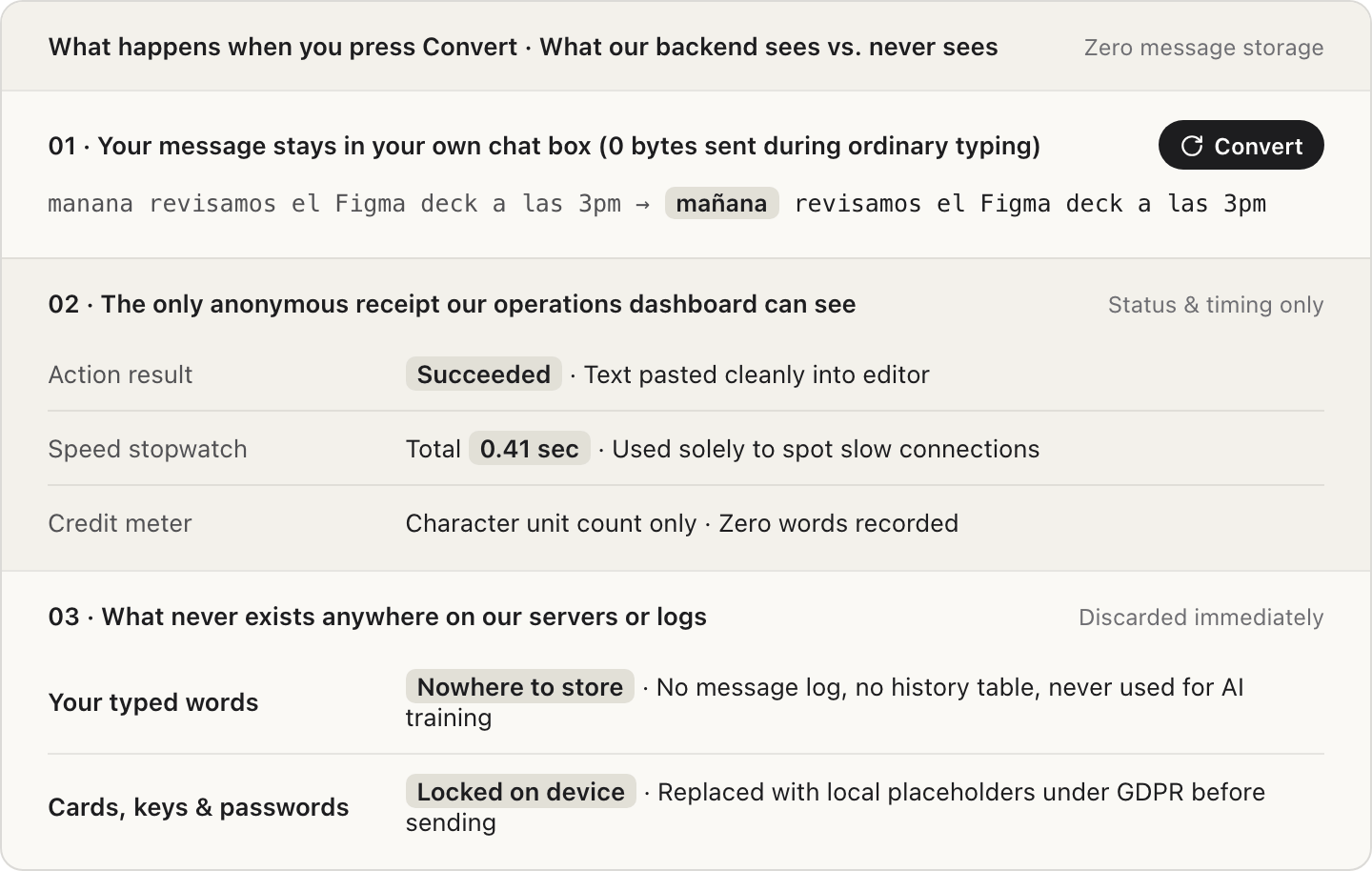
Network activity happens only at the exact moment you finish a bilingual phrase — say manana revisamos el Figma deck a las 3pm — and intentionally press Convert. Even then, what if that sentence happens to include a bank card number, a labelled password, a work email address, or an API key? Built by our UK-registered company FIGURICH LTD under the UK Information Commissioner's Office UK GDPR data-minimization rules, a local privacy guard inside your device locks those sensitive items first, swapping them for harmless temporary placeholders before anything goes out. Only the surrounding everyday words are converted, and your device slots the real card number or key right back in locally once the sentence returns (you can test this live on our Privacy & GDPR Zero-Retention page).
As for the fraction of a second when the cloud converts your sentence, the server processes your phrase in memory and discards it immediately. We keep no message logs, save no conversation history, and never allow your text to train any AI model. Even our credit-billing ledger records only the character-unit allowance used by that press, with no column in the database to store a single word you wrote.
Fixing bugs with status codes, never your text
A natural question people ask next is: "If you never store a single word, how does your team know when the keyboard fails inside an app or slows down?"
Tracking down editor bugs or slow connections never requires reading what someone typed. A strict filter right on your phone or computer allows only a few fixed status codes and timing readings out: whether Convert succeeded or failed, whether the failure happened on the network or while writing back into an editor, and whether the round trip took 0.4 seconds or 1.2 seconds. Actual typed text is blocked on your device from ever entering a report (for iPhone-specific OS protections, see why iOS keyboards show the Allow Full Access prompt).
Those status codes and latency readings are already everything an engineering team needs. When an office app updates its text box and we see a spike in write-back failures for that app, our engineers simply open that same app on our own computers, type a dummy test line, and ship a fix — without ever needing to know what document anyone was writing. Likewise, if anonymous latency readings show connections slowing down by half a second in a region, we tune network routing right away.
Optional multi-device sync and full offline control
Personal Memory (your learned vocabulary, phrasing preferences, and app context) stays local on your device by default and skips sensitive lines automatically. The only place our cloud holds items on your behalf is when you actively choose to turn on optional multi-device sync, such as optional Personal Memory cloud sync available with an Unlimited plan to keep phrasing preferences synced across your laptop and phone, saved custom glossary packs, or snippets manually sent through Cross-Device Clipboard (transmitted over HTTPS and encrypted at rest with server-managed keys rather than client-side end-to-end encryption, automatically expiring within minutes). None of these features record your chat conversations, and you can clear your local or synced Personal Memory at any time in Settings (full details in Privacy and protected content).
You also remain in full control of how UnimeType connects. You can turn off anonymous diagnostic stats with a single switch in Settings, connect your own personal API key stored in your device's hardware keychain, or run our open-weight lightweight models completely offline on Mac, Windows, and Linux through LM Studio so even pressing Convert never touches the internet. Trustworthy keyboard privacy should never ask you to take a developer's word for it. It should be built so nobody, including us, can read what you type.
Download UnimeTypeiOS, Android, macOS, Windows, Linux, and ChromeOS
View downloadsNext: We Built a Keyboard With No Competitors, and Now We Worry It Asks Too Much