We Built a Keyboard With No Competitors, and Now We Worry It Asks Too Much
Every founder knows the half-joking rule of thumb: a crowded market is exhausting, yet finding zero direct competitors is what really gives you a cold sweat. Either you stumbled onto a genuine blind spot hiding in plain sight, or everyone who tried before quietly died trying to retrain user habits. While building UnimeType over the past several months, we have argued both sides of that question almost every week.
The first reality check arrives the moment someone asks what we do.
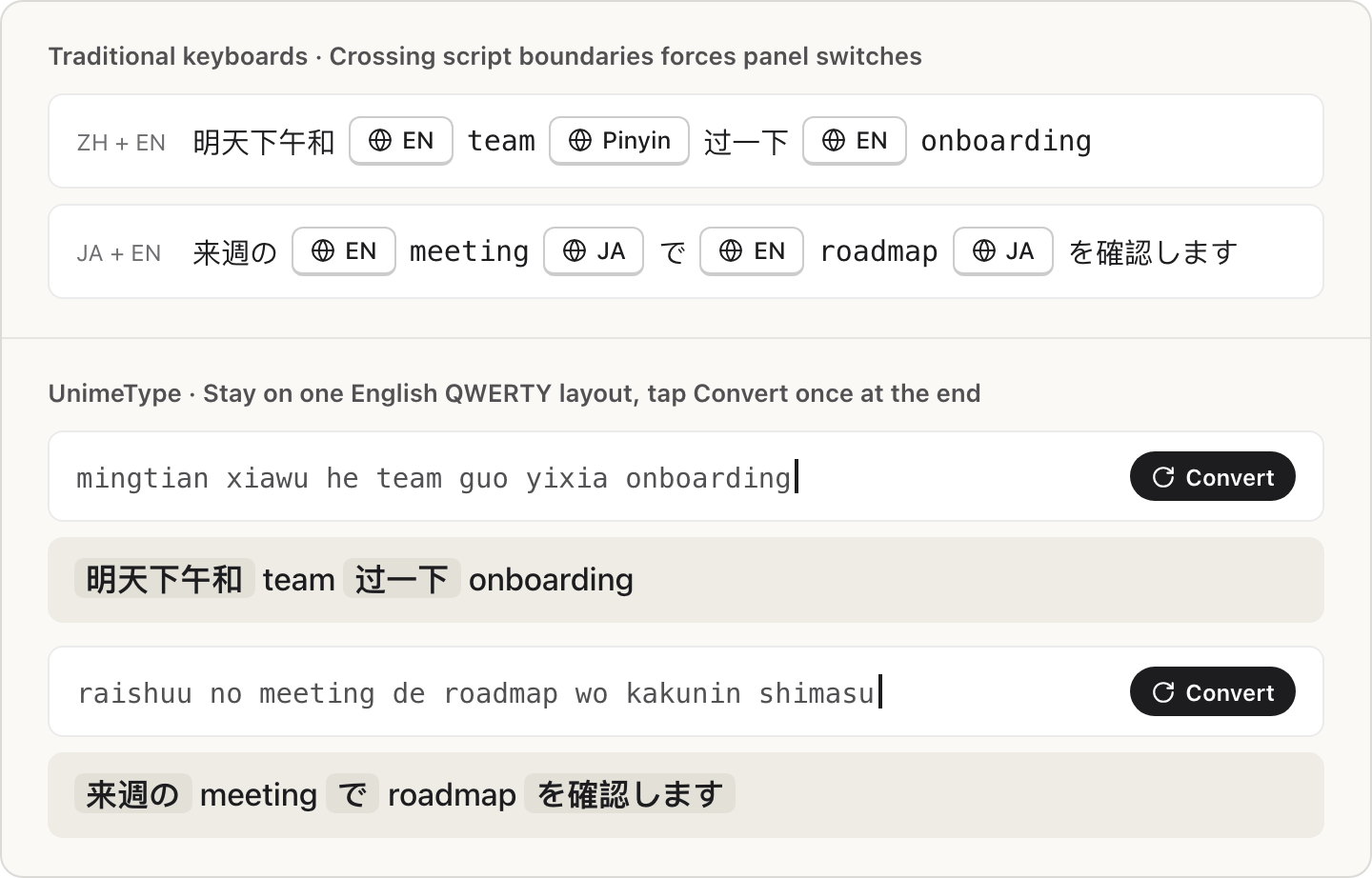
Call it an input method, and people picture Gboard, Apple's built-in keyboards, or Microsoft SwiftKey and ask how big our dictionary is. Call it an AI keyboard, and they picture a chatbot bar that drafts polite replies to their boss. When we describe the actual mechanic—your keyboard stays on plain English QWERTY all day; you type phonetic syllables and English words straight through in one sentence, then press Convert once at the end—there is almost always a two-second pause across the table. Every word makes sense, yet their fingers cannot quite picture the motion. Without an existing category label to borrow, every new user starts with an explanation tax.
Explaining the idea out loud is only half the hurdle. Twenty years of muscle memory is the harder half.
From the first day anyone learns to type Pinyin, Romaji, or Hinglish, we drill the exact same two-second loop: tap two or three letters, glance down at the floating candidate bar, thumb the spacebar to commit a word, and reach a pinky over to Shift or the Globe key whenever an English term shows up. That loop breaks single-key shortcuts in Figma, turns \cite{} into full-width punctuation in Overleaf, drops hollow periods into $18.5 Excel quotes, and freezes WASD movement in games—yet our hands still expect that micro-pause. Taking the live candidate bar away feels strangely weightless for the first five minutes, enough to lose an impatient tester before the habit clicks.
For a while, we wondered whether we had built a tool solely for people like us who live inside ten open windows all day.
Early users who never write a line of code convinced us otherwise. An apparel merchandiser in export trade told us she spent every afternoon with WhatsApp inquiries and Excel price sheets on one monitor and supplier chats in LINE and Slack on the other, deleting accidental full-width periods out of dollar prices a dozen times a day; three days after pushing past the initial awkwardness, her left pinky finally stopped hovering over the mode-switch key. A grad student abroad wrote that dropping a local venue name like 渋谷駅 or 鼎泰豐 into an English email to labmates used to take two trips around the phone's Globe key, whereas typing the phonetics inline and tapping Convert once felt effortless. Watching everyday bilingual users cross that ten-minute threshold—and refuse to go back—told us the underlying pain was real.
Respecting how stubborn typing habits are also keeps us honest about our own limits. We never set out to rip traditional IMEs off anyone's device (see When not to use an AI keyboard). Whenever a passage is dense with rare characters, obscure proper names, or archaic kanji where visually picking from a live candidate bar character by character is safer, we switch straight back to a traditional candidate-bar keyboard ourselves. Even in our onboarding, we cut the conceptual pitch down to a single everyday mixed sentence you type and convert with your own hands (see Setup and shortcuts). Rather than claiming to overthrow twenty years of typing overnight, we would rather earn our keep in the narrow seam where cross-app switching and bilingual sentences hurt most.
Download UnimeTypeiOS, Android, macOS, Windows, Linux, and ChromeOS
View downloadsNext: Three Ways People Try to Type Without Switching Keyboards (And Where Each Breaks)