
Zero Upload Until Convert, On-Device GDPR Masking, Zero Retention
UnimeType gives you one English keyboard across all your apps and languages backed by three hard architectural guarantees. Ordinary typing, backspaces, and app shortcuts stay 100% local on your device with 0 Bytes sent; when you explicitly tap Convert, Polish, or Explain, an on-device DLP guard masks API keys, passwords, bank card numbers, and emails in local RAM under UK and EU GDPR data minimization before sending, and managed requests run with zdr: true zero retention—discarded immediately after reply.
Everyday typing, backspaces & app shortcuts stay 100% local
Keys, passwords & card numbers masked in local RAM first
No prompt logs, zdr: true, discarded right after reply
el nuevo key sk-live-9f8a7b6c5d4e3f2a1b ya lo envie a ops@company.comel nuevo key [[UNIMETYPE_PROTECTED_0_SECRET_0]] ya lo envie a [[UNIMETYPE_PROTECTED_0_EMAIL_1]]el nuevo key [[UNIMETYPE_PROTECTED_0_SECRET_0]] ya lo envié a [[UNIMETYPE_PROTECTED_0_EMAIL_1]]el nuevo key sk-live-9f8a7b6c5d4e3f2a1b ya lo envié a ops@company.comZero network traffic until you explicitly tap Convert
Cloud autocomplete keyboards stream syllables as you type so remote servers can rank candidate words in real time. UnimeType decouples everyday typing from AI inference completely. While you press single-key tools in Figma, enter formulas in Excel, write commands in Overleaf, play games, or draft messages in Slack and WhatsApp, your keyboard outputs clean local ASCII with strictly 0 Bytes of background network traffic.
Even on iPhone and iPad—where Apple’s two-tier Custom Keyboard sandbox (RequestsOpenAccess) shows a generic Full Access prompt for any keyboard that reads shared settings or makes button-triggered network calls—UnimeType asks for explicit consent first and sends a request only at the moment you tap Convert, Polish, or Explain. Standard OS password and payment fields automatically hand input back to the built-in system keyboard.
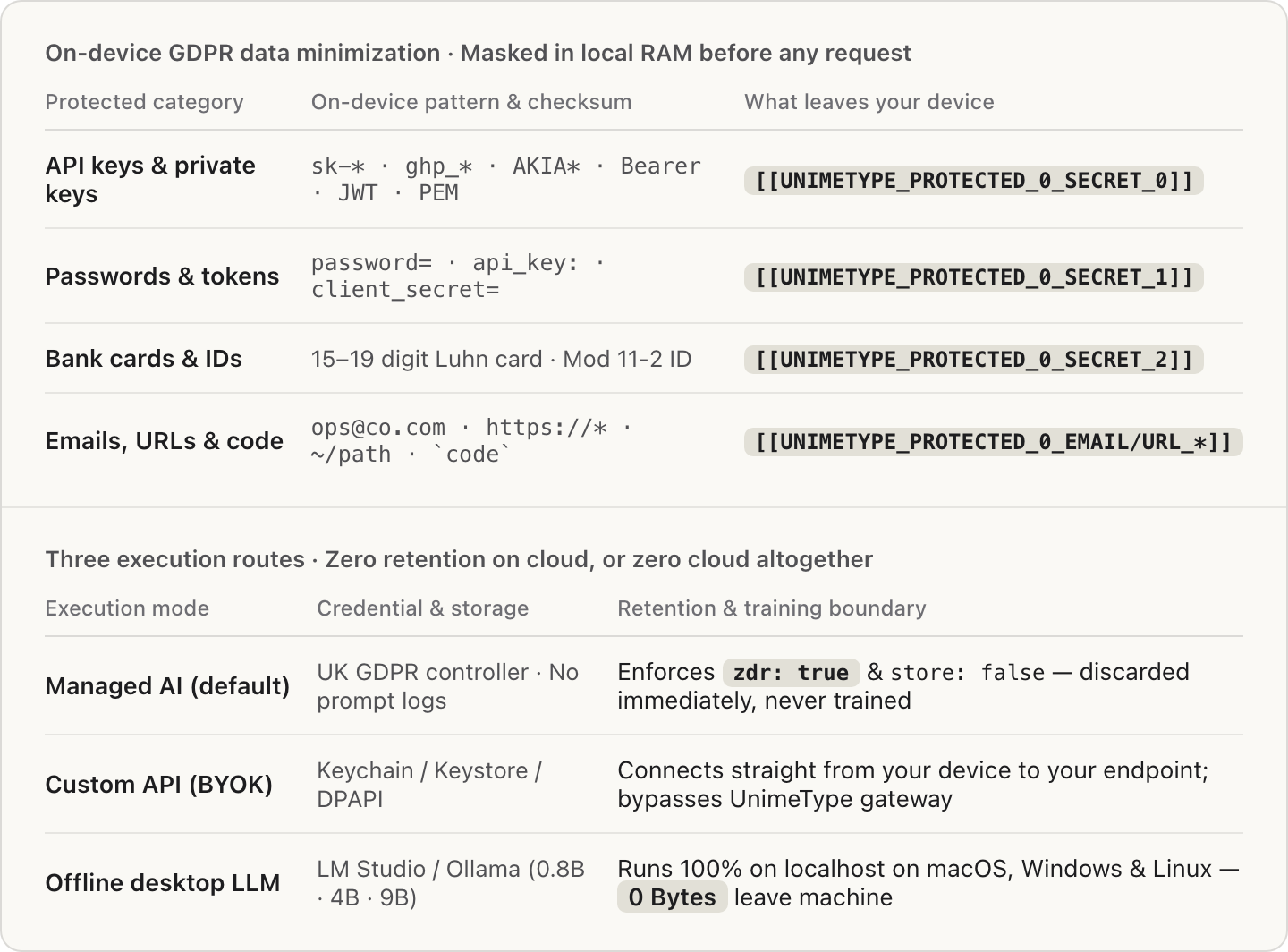
On-device sensitive-data masking built for GDPR data minimization
Real workplace messages sometimes contain a staging API key, a colleague’s email address, or a test credential right inside the sentence you want to convert. Governed by UK and EU GDPR Article 5(1)(c) data minimization and Article 25 data protection by design (operated by FIGURICH LTD, registered in London, England, No. 15975561), UnimeType runs a deterministic on-device DLP pass in local RAM before encryption, swapping sensitive spans into opaque placeholders such as [[UNIMETYPE_PROTECTED_0_SECRET_0]].
On-device detectors cover structured secrets (sk-, ghp_, AKIA, Bearer, JWT, and PEM/OpenSSH private key blocks), labelled passwords and tokens (password=, api_key:, client_secret=), 15-to-19-digit bank card numbers verified by Luhn checksum, national ID numbers verified by ISO 7064 Mod 11-2 checksum, plus email addresses, parameterized URLs, local file paths, and code spans. The remote model sees only the opaque placeholder and echoes it untouched; your client restores the real value locally in RAM and automatically blocks sensitive lines from entering on-device user memory.
End-to-end zero data retention, BYOK, or 100% offline desktop LLMs
On the default Managed AI route, UnimeType disables gateway prompt and output logging and never stores your submitted text or generated outputs in our account database or request caches. Outbound upstream requests attach protocol-level zero-data-retention and no-training parameters (zdr: true, data_collection: "deny", and store: false where supported), discarding the payload in memory as soon as your result returns.
When your team requires direct infrastructure control, Custom API (BYOK) encrypts your own key inside Apple Keychain, Android Keystore, Windows DPAPI, or Linux Secret Service and connects straight from your device to your endpoint without touching the UnimeType gateway. On macOS, Windows (beta), and Linux (beta), you can also point UnimeType at a local LM Studio, Ollama, mlx_lm, or llama-server instance running our open-weight 0.8B, 4B, or 9B models so Convert and Reconvert (Another) across all 12 languages run 100% offline.
Common questions
Does the AI model ever see an API key, password, or card number inside my sentence?
No. Before any packet leaves your device, UnimeType replaces detected API keys, labelled passwords, Luhn-verified card numbers, and emails in local RAM with [[UNIMETYPE_PROTECTED_*]] placeholders, converts only the surrounding language, and restores the original values on-device afterward.
How does UnimeType enforce zero data retention and prevent model training?
UnimeType disables gateway message-body logging, stores zero message history in our databases, and sends protocol-level zero-retention flags (zdr: true, data_collection: "deny", store: false) on managed upstream routes so requests are processed transiently in memory and discarded immediately.