
UnimeType vs. FUTO Keyboard: Local Single-Alphabet Swipe vs. Cross-Script Bilingual Convert
FUTO Keyboard is an admirable source-available Android keyboard focused on 100% offline Latin-alphabet swipe typing and on-device Whisper voice dictation, whereas UnimeType is built for bilingual users who mix English with Chinese, Japanese, Hindi, Arabic, Russian, Vietnamese, Greek, or European accents across Android, iOS, macOS, Windows, and Linux. Both reject background keystroke surveillance during ordinary typing—solving two very different daily problems.
Where FUTO Keyboard shines—and where cross-script bilinguals hit a wall
If your daily typing on Android is primarily English or another single alphabet—and you want offline glide typing plus local Whisper voice-to-text with zero internet permission—FUTO Keyboard is one of the cleanest Android keyboards available today.
However, FUTO is not designed for cross-script phonetic conversion (such as typing Pinyin + English, Romaji + English, Hinglish, or Arabizi on one US QWERTY layout) and is Android-only. UnimeType lets you draft mixed-script sentences on a single English QWERTY layout across Android, iPhone, Mac, Windows, and Linux, converting the whole sentence in one tap while keeping English terms untouched.
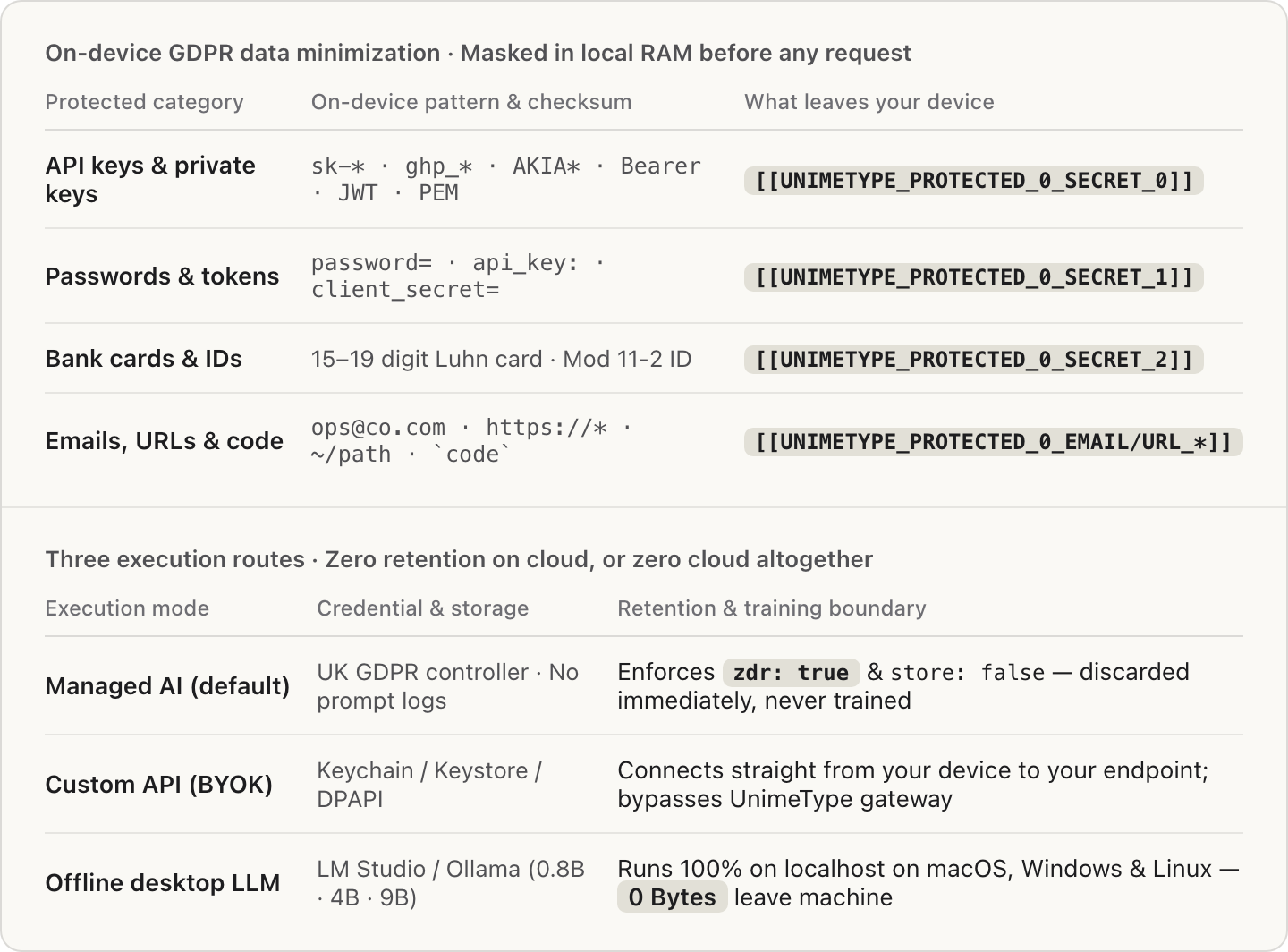
Honest privacy boundaries on mobile vs. desktop offline models
Running multi-billion-parameter LLMs locally inside a mobile keyboard sandbox drains battery and heats up phones within minutes. That is why UnimeType keeps all ordinary typing, passwords, and shortcuts 100% local (0 Bytes transmitted), and on mobile triggers a zero-data-retention (zdr: true) request only when you deliberately tap Convert—after masking card numbers, passwords, and API keys on-device.
On macOS, Windows, and Linux—where RAM and cooling allow it—we publish open-weight 0.8B, 4B, and 9B transliteration models on Hugging Face so you can run Convert and Reconvert completely offline on 127.0.0.1.
Using FUTO and UnimeType side by side on Android
Android lets you switch enabled keyboards in one tap via the bottom-corner keyboard icon. Many privacy-conscious bilingual users keep FUTO installed for offline voice dictation and one-handed English glide typing, while using UnimeType whenever chatting across two scripts or working across phone and desktop.
Common questions
Does UnimeType log or upload my everyday keystrokes?
Never. Ordinary keystrokes, shortcuts, and password fields generate zero network requests (`0 Bytes`). Only the draft in the active field at the moment you tap Convert, Polish, or Explain is processed, with zero message-text storage in server databases or logs.
Does FUTO Keyboard work on iPhone, Mac, or Windows?
FUTO Keyboard is currently an Android app. UnimeType provides native apps for Android, iOS/iPadOS, macOS, Windows, and Linux.