Why Your Keyboard Types Wrong Characters or Symbols, and How to Lock It to Plain English
Few computer glitches feel more disorienting than pressing a familiar key and watching a completely different symbol appear on screen. You press Shift + 2 for @ and get ", type hello on a laptop and get he336, or enter $12.50 into an Excel cell only to see 12。50 break the formula.
Before unplugging your keyboard or reinstalling drivers, check the four software states below. Roughly nine out of ten "keyboard typing wrong characters" cases come down to an accidental layout swap, a laptop Num Lock layer, or an active input method editor (IME) intercepting punctuation.
Four 60-Second Fixes Matched to the Exact Wrong Character
Look at which specific keys are misbehaving to pinpoint the cause immediately:
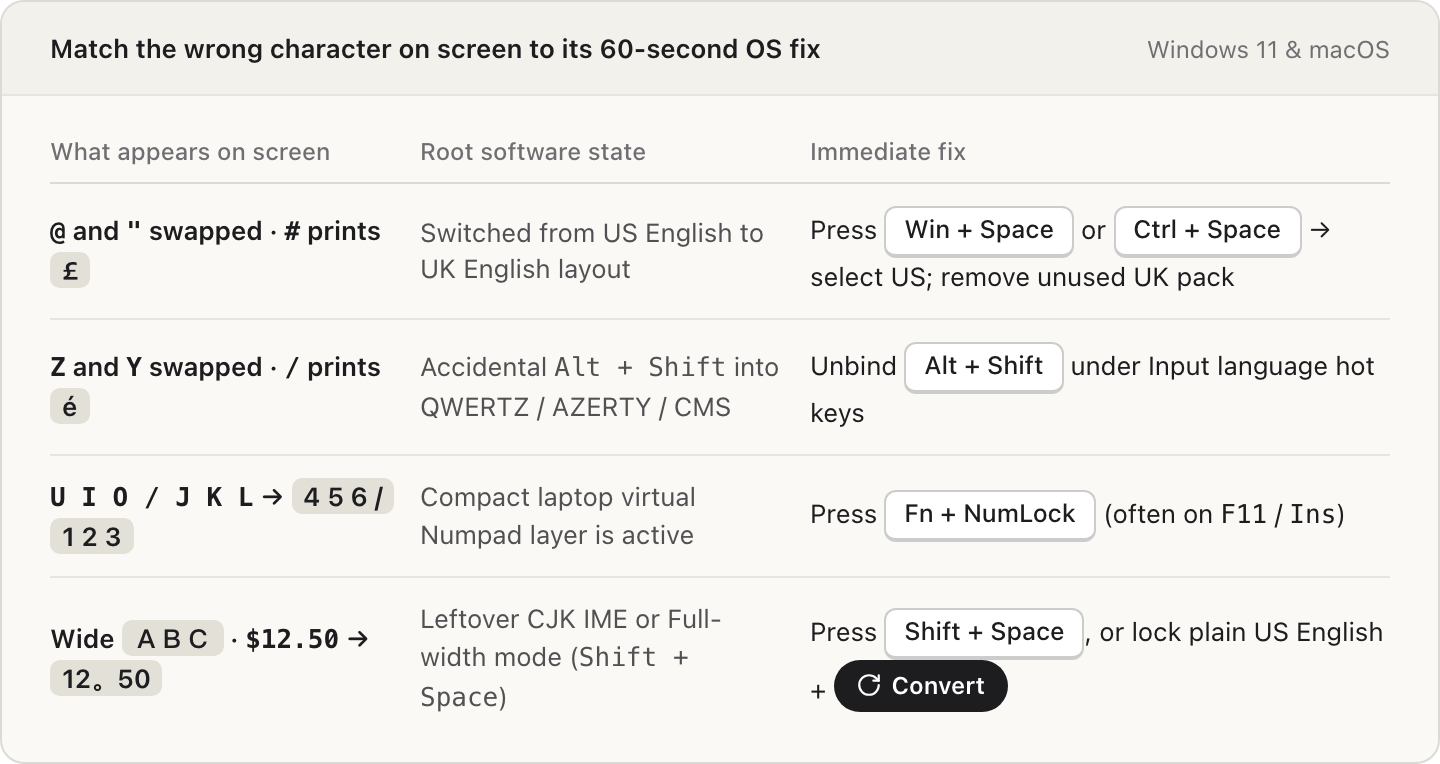
@and"are swapped (and#prints£): Your operating system switched from US English to UK English QWERTY. PressWin + Spaceon Windows 11 (orCtrl + Spaceon macOS) until English (United States) — US is highlighted. To stop it from returning, open Settings → Time & language → Language & region on Windows (documented in Microsoft's Windows keyboard layout guide), click the three dots beside your English pack, and remove the unused UK keyboard layout.ZandYare swapped, or/and?printéor_: Windows flipped into a German (QWERTZ), French (AZERTY), or Canadian Multilingual Standard layout—almost always triggered by brushingLeft Alt + Shiftwhile gaming or using editor shortcuts. PressWin + Spaceback to US, then disable theAlt + Shifthotkey under Settings → Time & language → Typing → Advanced keyboard settings → Input language hot keys (step-by-step path in how to change keyboard language).- Right-hand letters (
U,I,O,J,K,L,M) print numbers (4,5,6,1,2,3,0): Compact laptops overlay a virtual number pad onto the right half of the alphabet. PressFn + NumLock(often marked onF11,F12, orInson Dell, Lenovo, HP, and ASUS notebooks) to return those keys to normal letters. - Letters look wide (
ABC), periods print as。, backslashes turn into、, orWASD/Vstops responding: A Chinese or Japanese IME is still active from your last chat window, orShift + Spacetoggled it into Full-width Alphanumeric mode. PressShift + Spaceto exit full-width spacing, or switch back to your plainENG/ABCinput source (covered in Apple's macOS input source guide).
Why Removing Extra Layouts Still Leaves Bilingual Users Stuck
If you only ever write in English, deleting every extra keyboard layout under Windows or macOS settings permanently ends the problem. Once English (US) is the sole installed layout, Alt + Shift and Win + Space have nothing left to accidentally activate.
If you work in two languages, however, you cannot simply delete your second input method—and keeping two active layouts on the same computer guarantees eventual state collisions. You reply to a supplier or teammate in Chinese, Japanese, Arabic, or Hindi, Alt + Tab back into Figma, Overleaf, Excel, or a Steam game, and watch your leftover IME swallow single-key shortcuts (V, R, T), corrupt \cite{} LaTeX commands, or hijack WASD movement.
Locking Your Computer to Pure US English With On-Demand Convert
That recurring collision is why we built UnimeType so you can leave your Windows PC, Mac, or Linux machine locked to pure half-width US English all day without giving up your second language.
During ordinary typing, UnimeType never intercepts keystrokes, never opens a live candidate popup, and never alters punctuation. Every @, ", ., \, single-key Figma tool shortcut, Excel formula, and game input behaves identically to a bare US QWERTY hardware layout.
When you actually want to send a message in Chinese, Japanese, Hindi, Arabic, Russian, or accented Spanish and French, you draft the sentence straight on that same English keyboard—mixing romanized words and English terms together:
zhe ban poster zai Figma li gai hao le, ba $12.50 bao jia dan fa qun li
Press Convert once at the end (Caps Lock or Option + Enter, configurable in setup and shortcuts), and the sentence converts cleanly in place to 这版 poster 在 Figma 里改好了,把 $12.50 报价单发群里—keeping poster, Figma, and $12.50 in exact half-width ASCII. The instant it finishes, your keyboard is still plain US English for the very next window you click.
On macOS, Windows, and Linux, UnimeType can run 100% offline against local open-weight 0.8B, 4B, or 9B models in LM Studio or Ollama, while ordinary typing uploads 0 Bytes across every platform (privacy and protected content). Clear out the accidental OS hotkeys first, trim any stray regional layouts you never use, and let one predictable English layout stay under your fingers all day.
Download UnimeTypeiOS, Android, macOS, Windows, Linux, and ChromeOS
View downloadsNext: I Tested Every Major iPhone Keyboard App in 2026, and Bilingual Typing Split Them in Half