
Bilingual Typing on Ubuntu & Linux Without Fcitx5/IBus Mode Switching
UnimeType for Linux lets you keep your terminal, Neovim, VS Code, Figma Web, and browser in pure half-width US ASCII and convert mixed-language sentences in one deliberate keystroke. Instead of wrestling with GTK_IM_MODULE / QT_IM_MODULE environment variables across Wayland, X11, Electron, and Flatpak apps—or getting Esc trapped by an active Pinyin or Mozc preedit buffer—you draft in plain Latin letters and convert on demand via cloud or local Ollama / llama-server models.
Why Wayland, Electron, and terminal workflows clash with traditional Linux IMEs
On Linux desktops (GNOME, KDE Plasma, Hyprland, Sway), setting up Fcitx5 or IBus with fcitx5-mozc, fcitx5-rime, or libpinyin works well inside native GTK/Qt windows, yet frequently breaks or loses candidate positioning inside Wayland Electron apps, Steam games, or sandboxed Flatpaks.
For developers living in terminals, tmux, and Neovim, forgetting an active CJK input mode means pressing Esc or :w feeds into a candidate popup instead of normal mode. UnimeType leaves normal typing in raw ASCII so commands and keybindings never stall, converting only the active text field when you press Convert.
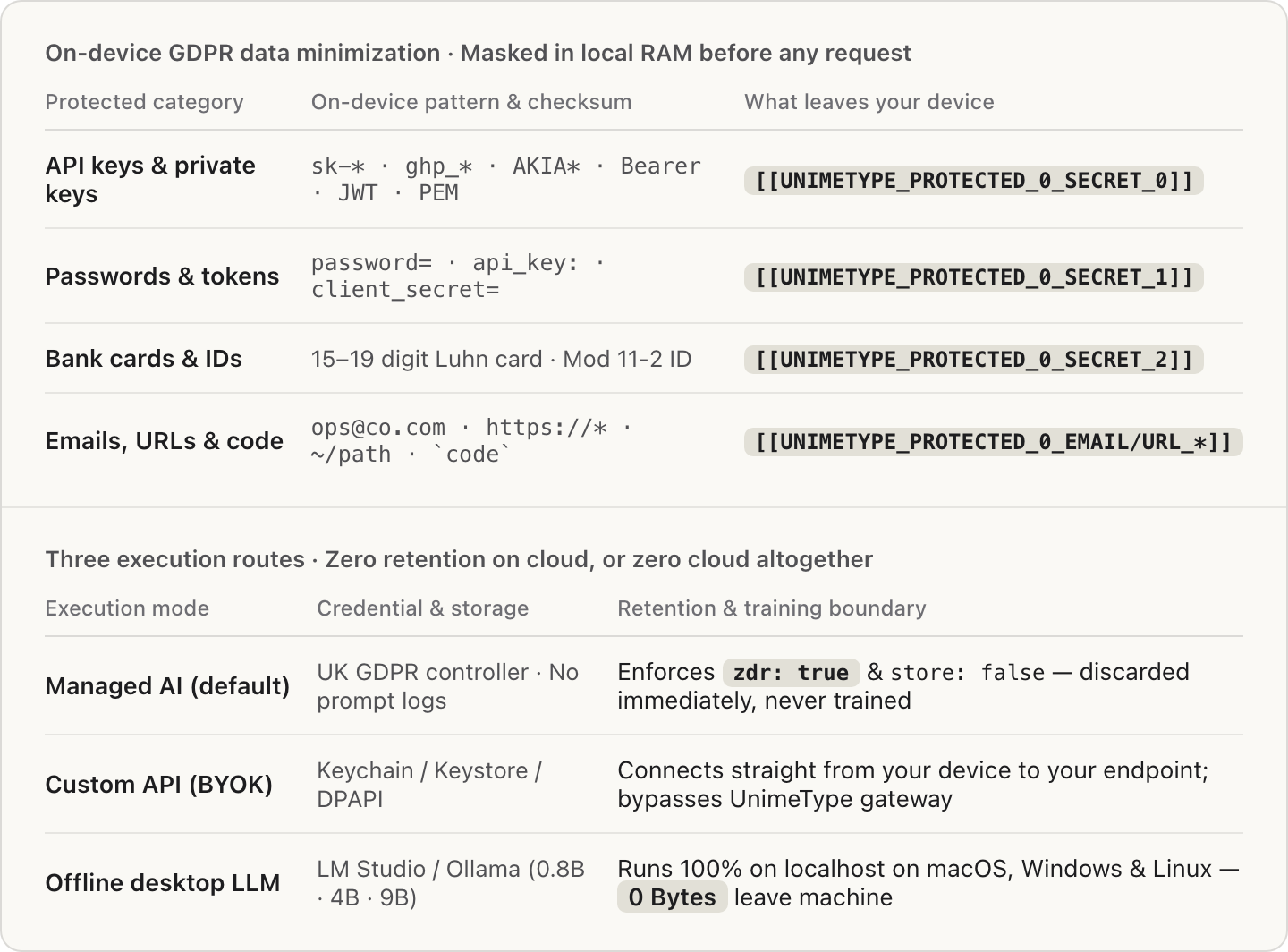
First-class self-hosted offline inference with Ollama and llama-server
Linux users care deeply about data sovereignty. UnimeType never transmits ordinary keystrokes (0 Bytes during regular typing), and on Linux you can bypass cloud APIs entirely by pointing UnimeType at http://127.0.0.1:11434 (Ollama) or llama-server running our open-weight 0.8B, 4B, or 9B transliteration models from Hugging Face.
When Fcitx5 + Mozc or Rime is still the right Linux tool
Keep Fcitx5 or IBus with Mozc or Rime configured when you write long single-language Japanese or Chinese documentation completely offline on low-RAM hardware where deterministic dictionary lookup uses minimal memory.
Add UnimeType when your Linux workday mixes English code, flags, and paths inside bilingual Slack, Discord, Matrix, or GitHub comments.
Common questions
Can UnimeType run 100% offline on Ubuntu or Arch Linux?
Yes. Run our open-weight 0.8B, 4B, or 9B GGUF models locally in Ollama or `llama-server` (`llama.cpp`) and set UnimeType’s custom endpoint to `localhost` for zero external network traffic.
Which languages does UnimeType Convert support on Linux?
All 12 supported target languages alongside preserved English: Chinese (Pinyin), Japanese (Romaji), Hindi (Hinglish), Arabic (Arabizi), Russian (Translit), Greek (Greeklish), Vietnamese, Spanish, French, Portuguese, German, and Italian.