I Loaded 40,000 English Words Into My IME — My Shortcuts and Terms Still Got Eaten
Last Friday afternoon, I finished replying to a teammate in Slack, hit Cmd + Tab back into Figma, and tapped V and R to grab the move and rectangle tools. Nothing moved on the canvas. Instead, a Pinyin candidate bar popped up in the top corner of my screen, waiting for me to pick a Chinese character. Even with Figma's official Chinese (Pinyin) keyboard layout preference enabled, an active OS input method still intercepts single-key shortcuts before the canvas ever sees them.
If you work in two languages (Chinese and English, Japanese and English, or Russian and English), that tiny state mismatch ambushes you all day long. Researchers reply to an advisor's message, jump back into Overleaf to type \cite{}, and watch the backslash turn into a Chinese pause mark 、. Export and operations teams bounce between English WhatsApp quotes (FOB Shenzhen, $12.5) and domestic supplier chats, turning decimal points into hollow full-width periods $12。5. Gamers alt-tab out to answer one message, forget to switch back to English, press WASD to dodge, and watch their character stand frozen while a string of raw Pinyin letters trails off the corner of the screen.
Even inside a single chat window, sending one casual bilingual update like "HeroBanner 在 Figma 调好了,报价 $12.5 发 main 群" ("HeroBanner is adjusted in Figma, send the $12.5 quote to the main group") forces repeated toggles. Miss one Shift press and your component name splits in half, short English words turn into random homophones, and punctuation flips to full-width.
For a long time, I assumed this was just a dictionary problem. If my input method kept mangling English words, surely feeding it a bigger English word list would calm it down. Over the past year I tried every setup people recommend: built-in "mixed English" toggles in mainstream Pinyin apps, macOS uppercase pass-through tweaks, and finally a custom Rime setup loaded with the Ice Pinyin (rime-ice / melt_eng) lexicon of roughly forty thousand English words.
For household nouns like Docker, Figma, or Markdown, that huge word list genuinely helped. Yet the moment the afternoon got busy, my text and shortcuts still kept colliding with the candidate bar.
Newly coined names were always the first thing to break. Whether it is a Figma layer named HeroBanner_v2, a product SKU in Excel, or a React hook like useLayoutEffect, no static dictionary on earth knows what your team named something ten minutes ago. Worse, in most live Pinyin engines, the Shift key pulls double duty as the buffer-commit and mode-switch trigger. The instant your finger holds Shift to type the capital B in HeroBanner or the L in useLayoutEffect, the first half of the word gets kicked out raw while the remaining letters fall right back into Chinese phonetic matching.
Short everyday English words were just as stubborn. Words like main, ban, ping, in, de, and tag happen to be valid, high-frequency Pinyin syllables too. Even when main sits inside your auxiliary English dictionary, a keystroke-by-keystroke IME cannot rank English main ahead of common Chinese characters every time you type m-a-i-n, or normal Chinese typing would grind to a halt. Without seeing the words that come after main, a live popup is forced to guess blind.
And none of those dictionary entries fix punctuation or single-key app shortcuts. As long as the OS remains in a Chinese input state, \cite{} in Overleaf, $12.5 in a quote sheet, v1.4.0 in release notes, and V or WASD in Figma and Steam get intercepted before the app ever sees a clean ASCII keystroke.
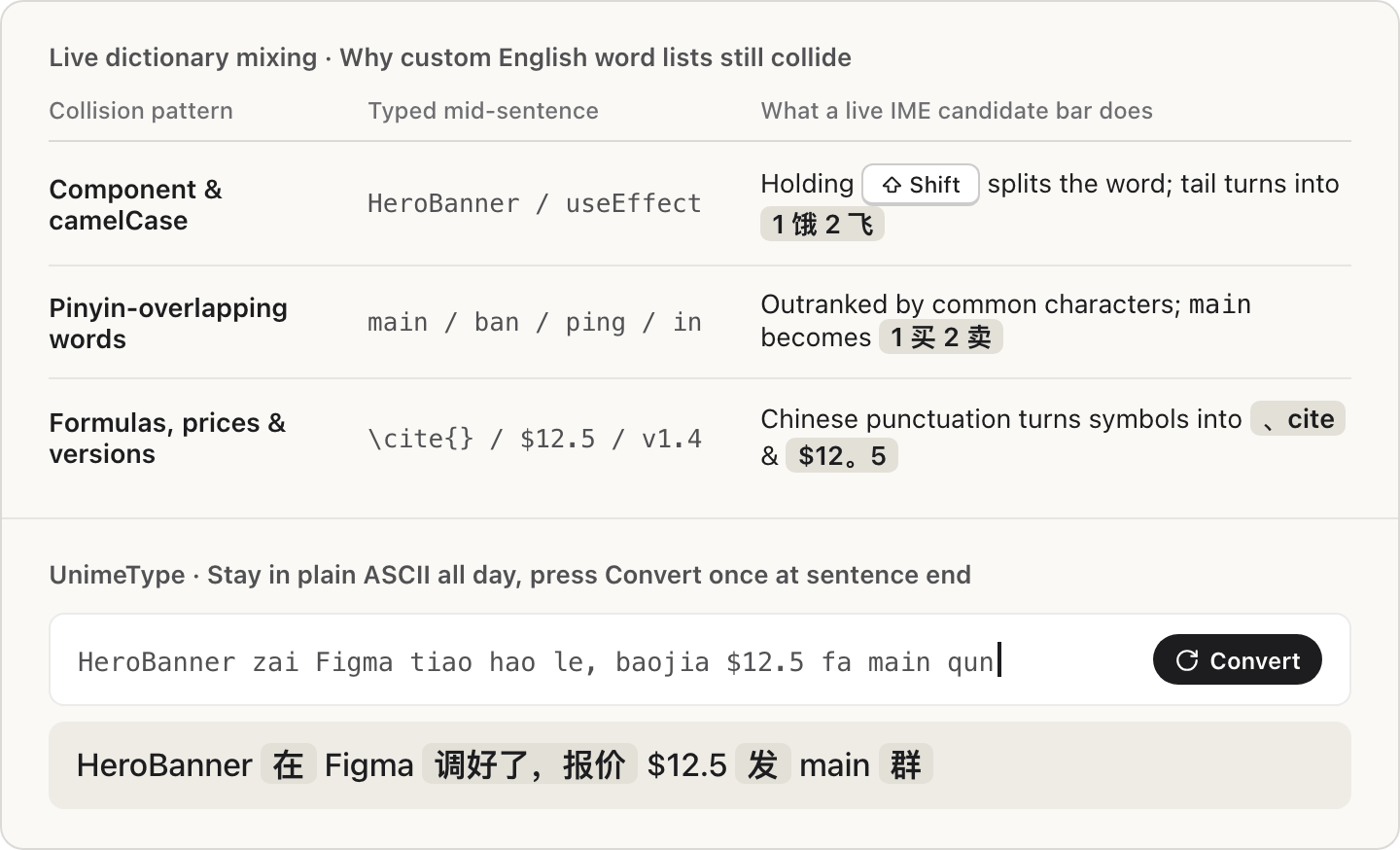
Looking at all of those small wrecks together finally made the root cause obvious. Nothing was wrong with Rime's YAML files. The friction comes from asking an input method to guess which language you mean on the third keystroke, while keeping your entire operating system trapped in a non-ASCII input mode between messages.
That is why I stopped leaving a live Pinyin buffer armed during the workday and moved mixed conversations to UnimeType's whole-sentence workflow. My computer and phone stay in plain US ASCII English all day. Jumping back into Figma for V and R, typing \cite{} in Overleaf, editing $12.5 in Excel, or hitting WASD in a game always delivers raw English keys on the first press — zero mental check required.
When I switch back to Slack or WhatsApp to send a bilingual line, I stay on that exact same English keyboard and type the Pinyin and English words straight through together:
HeroBanner zai Figma tiao hao le, baojia $12.5 fa main qun
Nothing pops up while I type, HeroBanner keeps its exact casing, and $12.5 keeps its half-width decimal point. When the sentence is done, I press my Convert shortcut once. Reading the finished line as a whole makes it obvious from context which spans are Pinyin and which spans are component names, prices, or short English words like main, converting the Chinese words in place (HeroBanner 在 Figma 调好了,报价 $12.5 发 main 群) while leaving every English token intact (see Input languages for how preserved English spans work across supported scripts).
I still keep Rime on my Mac for passages packed with rare characters or obscure proper names where visually scanning a live candidate list character by character helps, as we note on our Rime comparison page. During the actual workday of bouncing across Figma, Overleaf, spreadsheets, and bilingual chats, keeping the keyboard in plain English and converting finished sentences once beats curating custom dictionaries forever. You can try that workflow directly on the bilingual keyboard guide.
Download UnimeTypeiOS, Android, macOS, Windows, Linux, and ChromeOS
View downloadsNext: Three Ways People Try to Type Without Switching Keyboards (And Where Each Breaks)