Five Operating Systems, Five Toggle Shortcuts: How I Unified My Bilingual Typing Habit
Five different devices sit on my desk every day: a MacBook for product docs and Figma layouts, a Windows PC for desktop testing and evening Steam games, an Ubuntu Linux workstation running Wayland, plus an iPhone and an Android phone within arm's reach. All three computers share one compact 60% US ANSI mechanical keyboard.
I only type in two languages day to day, Chinese and English. In theory, that shouldn't be complicated. What nearly broke my fingers was the fact that five operating systems enforce five incompatible rules for switching between those two languages.
On macOS, my left pinky taps Caps Lock out of habit. Flip the keyboard receiver over to Windows, tap Caps Lock before a chat reply, and you are suddenly shouting in ALL CAPS; Windows wants Win + Space to pick an input source plus bare Shift inside the IME to toggle English mode, so holding Shift to sprint in a game or type an uppercase spreadsheet header routinely flips your input state behind your back. Switch to Ubuntu Linux on Wayland, and Fcitx5 or IBus defaults to Ctrl + Space while candidate popups occasionally drift to the corner of Electron or XWayland windows (a quirk documented in detail on the official Fcitx 5 Wayland wiki). Pick up the iPhone or Android phone, and the whole routine turns into thumbing a tiny Globe icon to flip between separate panels.
By Wednesday afternoon, my muscle memory was completely scrambled. I was hitting Caps Lock inside Figma on Windows, pressing Ctrl + Space on Mac, and blind-typing half a sentence of raw Pinyin letters into Slack on Ubuntu before realizing which machine had focus.
Looking for one bilingual input setup that actually felt identical across Mac, Windows, Linux, iOS, and Android, I spent real time living with the two cross-platform names people recommend most: Rime and Keyman.
Rime's open-source reach is genuinely impressive — Squirrel on macOS, Weasel on Windows, fcitx5-rime or ibus-rime on Linux, Hamster on iOS, and Trime on Android. Once you run all five daily, though, five community front-ends mean five separate config directories and sync routines, desktop apps still inherit each OS's local Shift and Ctrl + Space landmines whenever you Alt + Tab between chat and Figma or Excel, and mobile keyboards feel completely unrelated to desktop Squirrel. Keyman, meanwhile, excels at delivering static layouts for hundreds of scripts across devices, yet it still works by switching keyboard layouts rather than keeping one clean ASCII state across apps and mixed sentences.
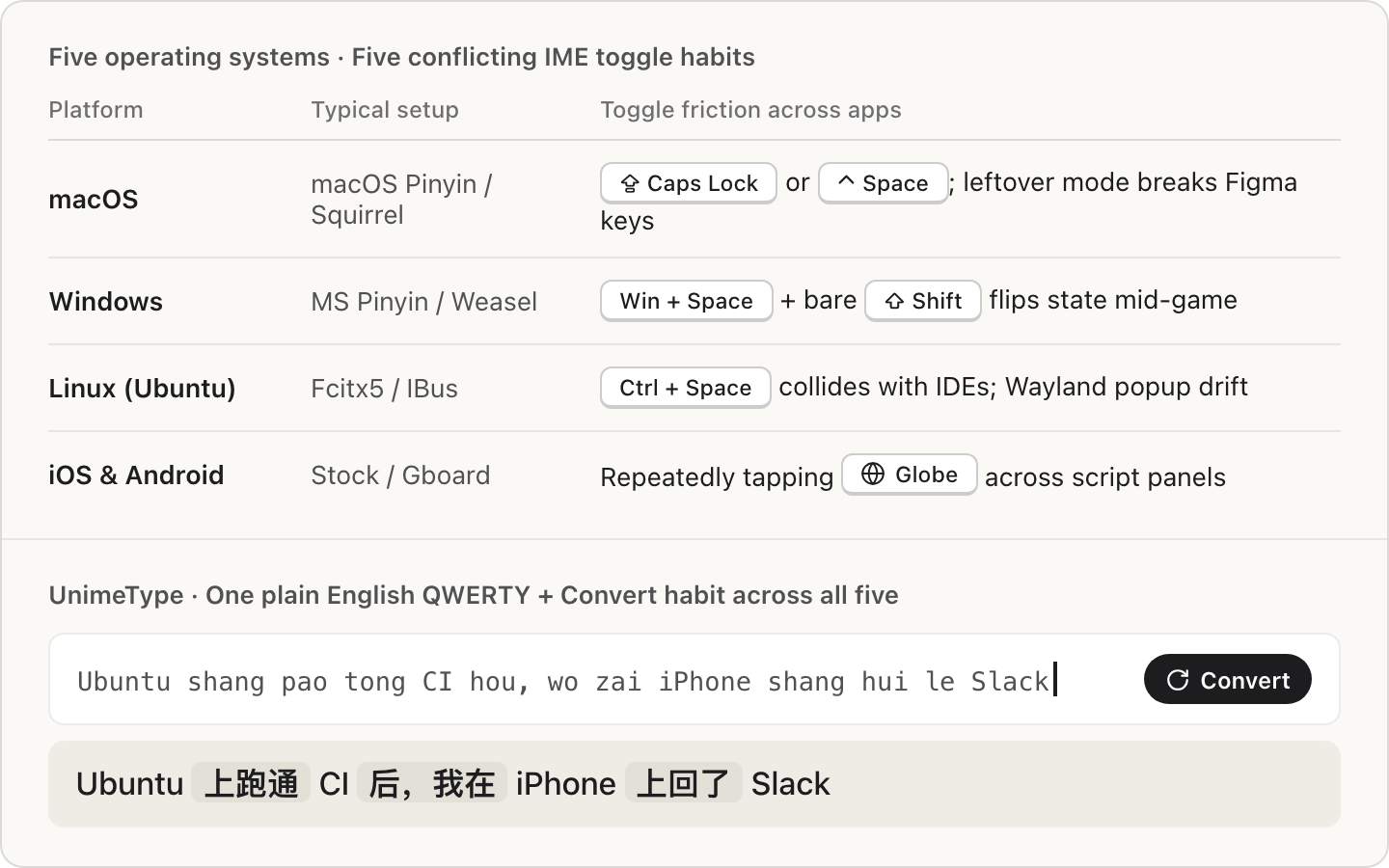
What finally calmed my hands down was noticing the one thing already identical across macOS, Windows, Ubuntu Linux, iOS, and Android, even on a 60% US mechanical board with zero extra language keys: the standard 26-key English QWERTY layout.
After installing UnimeType across my five devices (macOS, iOS, and Android, alongside the Windows and Linux desktop betas on the Download page), I retired mid-task mode switching altogether. Every device stays in plain English QWERTY by default. When I switch back to Figma for single-key tool shortcuts, type \cite{} in Overleaf, edit formulas in Excel, or hit WASD in a Windows game, every keystroke is clean ASCII without a floating IME buffer getting in the way.
When I jump into Slack, WhatsApp, or iMessage to answer a mixed Chinese-English message, my fingers do the exact same thing on every screen: type the Pinyin and English words straight through on the English layout (zhe ban Banner zai Mac shang gai hao le, wanshang fa Windows ce yixia), and trigger Convert once at the end, using one shortcut on desktop or one toolbar tap on mobile (see Setup and shortcuts). The Chinese words convert in place while Banner, Mac, and Windows stay untouched.
Because ordinary typing never opens a live candidate popup on every keystroke, Wayland popup drift on Linux stops breaking my train of thought, bare Shift on Windows stops flipping my input state, and a compact US keyboard works the same everywhere.
I still keep built-in system IMEs installed for air-gapped test machines without a local model and for passages dense with rare characters where scanning a candidate bar visually helps. During the rest of the week across five screens, design canvases, spreadsheets, and bilingual chats, reducing five conflicting toggle habits down to "plain English plus one Convert key" gave me back a single set of muscle memory.
Download UnimeTypeiOS, Android, macOS, Windows, Linux, and ChromeOS
View downloadsNext: Three Ways People Try to Type Without Switching Keyboards (And Where Each Breaks)