How to Type Spanish, French, and German Accents (ñ, é, ü, ç) on Any Keyboard Without Alt Codes
Every guide from fifteen years ago still tells Windows users to type ñ with Alt + 0241 and é with Alt + 0233. Try that on almost any modern 13-inch or 14-inch laptop and nothing happens: Alt codes require a dedicated hardware numeric keypad, not the number row across the top of a compact US QWERTY keyboard.
If you write in Spanish and English, French and English, or German and English on a standard US keyboard—or regularly email colleagues and cite authors with names like Muñoz, Céline, or Müller—here are the fastest native ways to type accent marks on every operating system, where Windows dead keys trip up technical work, and how to type accented sentences straight from plain ASCII.
Native Ways to Type ñ, é, ü, ç on Mac, Windows 11, and Mobile
Before installing anything, macOS and Windows 11 both ship built-in shortcuts that do not require a numeric keypad:
- macOS (Press-and-Hold or Option Dead Keys): Hold down
e,n,u, orcfor half a second in almost any Mac app and a numbered popup appears (e→ press2foré;n→ press1forñ), documented in Apple's macOS accent marks guide. Once your fingers want more speed, macOSOptionchords never require lifting your hands to the number row:- Acute (
á, é, í, ó, ú):Option + e, then the vowel - Tilde (
ñ):Option + n, thenn - Umlaut (
ä, ö, ü):Option + u, then the vowel - Grave (
à, è, ù):Option + - Cedilla (
ç) & Eszett (ß):Option + candOption + sdirectly
- Acute (
- Windows 11 Quick Emoji & Symbol Picker (
Win + .): On a tenkeyless Windows laptop whereAlt + 0241does nothing, pressWin + .(period) and click theΩSymbols → Latin tab to insert accented letters in any app. Inside Microsoft Word and Outlook specifically, chords likeCtrl + 'thenealso work, listed in Microsoft's accent keyboard shortcuts reference. - iPhone, iPad, and Android: Touch and hold the base letter (
n,e,u,c,s) and slide your thumb onto the accented glyph before lifting.
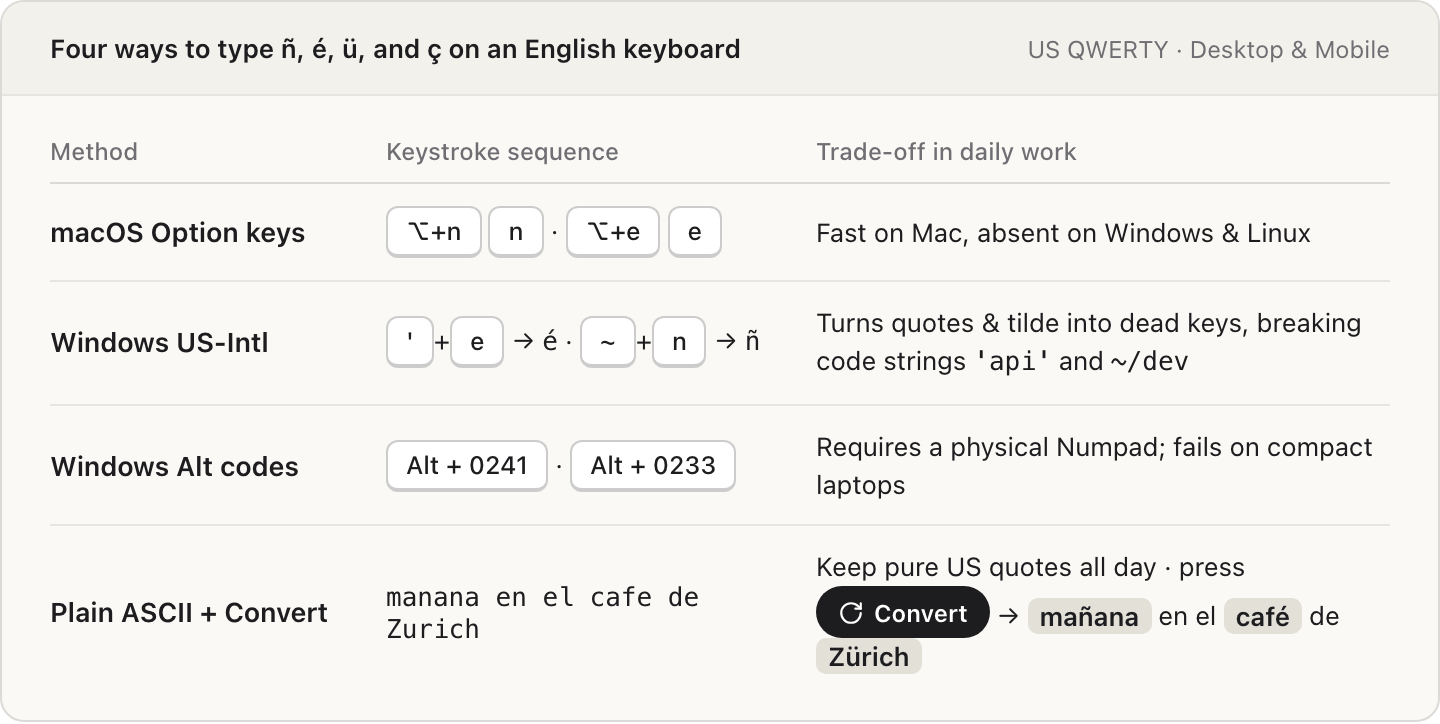
Why Windows US-International Drives Analysts and Developers Crazy
To avoid Win + . menus, most bilingual Windows users enable the United States-International keyboard layout under Settings → Time & language → Language & region. Typing ' + e for é and ~ + n for ñ feels quick in a casual email—until you open VS Code, Terminal, Overleaf, or Excel.
US-International works by turning five everyday ASCII punctuation keys—single quote ', double quote ", backtick `, tilde ~, and caret ^—into silent dead keys. When you type 'api' in Python or SQL, the first apostrophe produces nothing on screen; when you type the a right after it, Windows outputs 'ápi. Changing directories to ~/projects in a terminal swallows the tilde until you remember to tap the Space bar after every single quote and tilde. Switching back and forth between US (for code and spreadsheets) and US-International (for Slack and Mail) puts you right back into the same layout-switching loop you wanted to avoid.
Keeping Pure US Punctuation and Restoring Accents With Convert
If your workday splits between English technical tools and a second European language, keeping your OS locked to a standard, non-dead-key US English layout removes every quote and tilde surprise.
With UnimeType running on Windows, Mac, Linux, or mobile, every ', ", ~, and ` behaves as immediate plain ASCII in your editor, spreadsheet, and terminal all day. When you write a bilingual Spanish-English or German-English message in Slack or Mail, you type straight through without dead keys or Option chords:
manana revisamos el Q3 roadmap en el cafe con el equipo de diseno
Press Convert once at the end of the line (see setup and shortcuts), and UnimeType restores every diacritic in context while leaving your English terms alone:
mañana revisamos el Q3 roadmap en el café con el equipo de diseño
The same workflow handles German umlauts and ß (meeting in Zurich mit Herrn Muller uber die grosse Datei → meeting in Zürich mit Herrn Müller über die große Datei) or French accents (cote client, le resume du sprint est pret → côté client, le résumé du sprint est prêt) according to the target language enabled in input languages.
On macOS, Windows, and Linux desktops, you can run our open-weight models completely offline through LM Studio or Ollama; on mobile and cloud mode, ordinary typing sends 0 Bytes and on-demand conversion masks secrets locally under zero-retention rules (privacy and protected content). If you only need two é characters a month on a MacBook, Apple's Option + e chord is already unbeatable. If you bounce between Windows and Mac or write code and accented prose on the same keyboard all day, plain ASCII plus a single Convert press saves your quotes and your flow at the same time.
Download UnimeTypeiOS, Android, macOS, Windows, Linux, and ChromeOS
View downloadsNext: You Already Know What You Want to Say. Why Check Your Keyboard State First?