
UnimeType vs. Yamli: From Browser Copy-Paste to Native System-Wide Arabizi + English Convert
Yamli made typing Arabic from an English keyboard famous, yet today it traps you inside a web textarea and converts every word on Spacebar, turning English nouns into phonetic Arabic script. UnimeType brings Arabizi (2, 3, 5, 7, 9) + English whole-sentence conversion directly into WhatsApp, Slack, Notion, iMessage, and email across macOS, Windows (beta), Linux (beta), iPhone, and Android.
How UnimeType goes beyond Yamli and Windows-only tools
Yamli’s Smart Arabic Keyboard lives inside a web editor (forcing you to copy and paste back into your chat app), while newer Arabizi utilities like Type3arabi target Windows desktops only. UnimeType runs natively inside any text field on macOS, Windows (beta), Linux (beta), iOS, and Android—plus a free no-login web converter at /tools/arabizi-to-arabic.
Instead of replacing each word on Spacebar, UnimeType waits until you finish the sentence and tap Convert. Ordinary keystrokes stay 100% local on your device, your cursor stays strictly left-to-right while editing, intentional English words (cafe, gym, Figma, WhatsApp, PDF) stay in Latin, and desktop users can even run UnimeType’s open-weight 0.8B, 4B, and 9B models completely offline for Convert and Reconvert (Another) across 12 languages via LM Studio or Ollama with zero cloud calls.
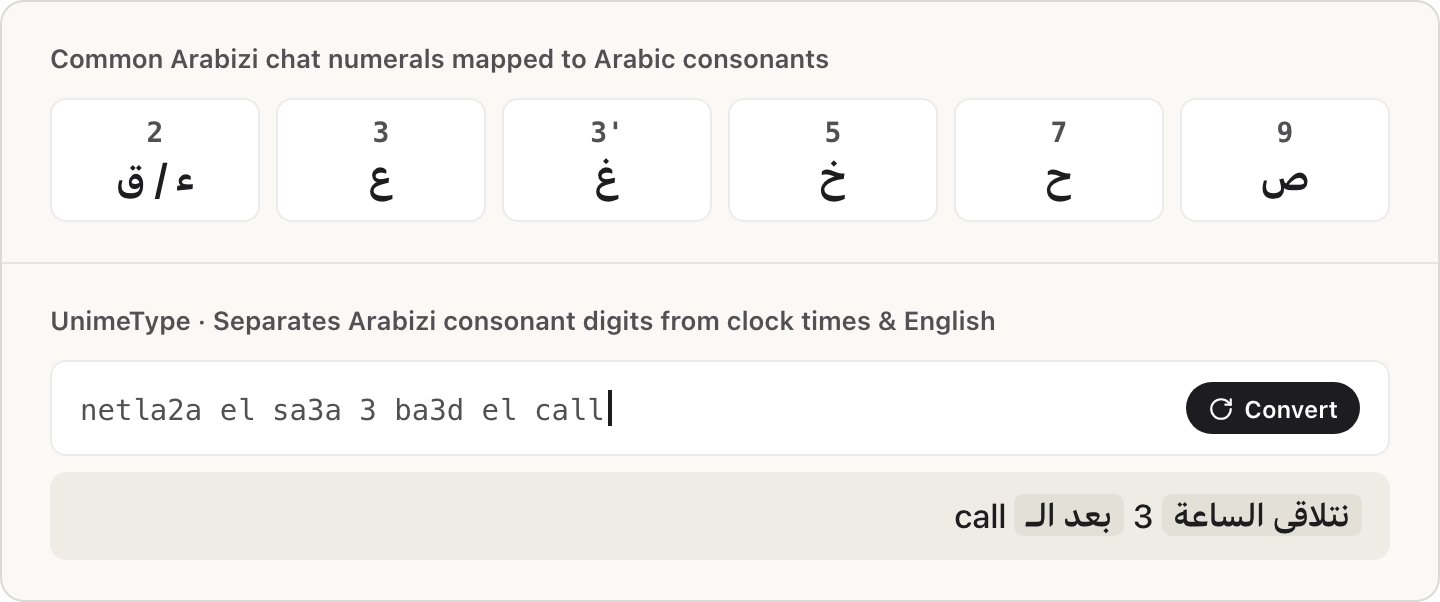
Disambiguating Arabizi chat digits (2, 3, 7) from real numbers and dialects
In everyday Franco-Arabic chat, 3 stands for ع inside sa3a (الساعة) yet means the number 3 one word later in el sa3a 3 ("at 3 o’clock"). Word-level lookup tables struggle whenever numbers, English acronyms, and Egyptian, Levantine, or Gulf dialect spellings appear together.
Reading the full clause lets UnimeType convert Arabizi spans into natural Arabic script—preserving your spoken dialect phrasing rather than forcing stiff textbook MSA—while leaving timestamps, ticket IDs, and English terms untouched.
When Yamli or an OS Arabic keyboard is enough
Yamli remains a quick zero-install scratchpad when you are on a borrowed computer typing a short monolingual Arabic query in a browser, and built-in macOS "Arabic – QWERTY" or native Arabic touch keyboards work completely offline for pure Arabic documents.
Install UnimeType when you write dozens of bilingual Arabic-English messages every day across desktop and phone and never want to fight BiDi cursor jumps or copy-paste tabs again.
Common questions
Does UnimeType preserve Egyptian, Levantine, and Gulf Arabic dialects like Yamli?
Yes. Convert changes the writing system from Latin/Arabizi into Arabic script without rewriting your spoken Levantine, Egyptian, or Gulf vocabulary into formal Modern Standard Arabic.