
How to Type Arabic on an English Keyboard Using English Letters (Arabizi)
Unless you have Arabic keycap stickers or years of touch-typing practice on an Arabic 101 keymap, typing Arabic on a US English keyboard is much faster phonetically. You can enable macOS’s phonetic Arabic – QWERTY layout, use an online Arabizi transliterator, or type Arabizi (2, 3, 5, 7) and English left-to-right and tap Convert once with UnimeType.
System Arabic and phonetic QWERTY layouts
If you touch-type on a traditional Arabic layout, enable "Arabic – PC" on macOS (System Settings → Keyboard → Input Sources → Edit → + → Arabic, Apple Support) or "Arabic (101)" on Windows 11 (Settings → Time & language → Language & region, Microsoft Support).
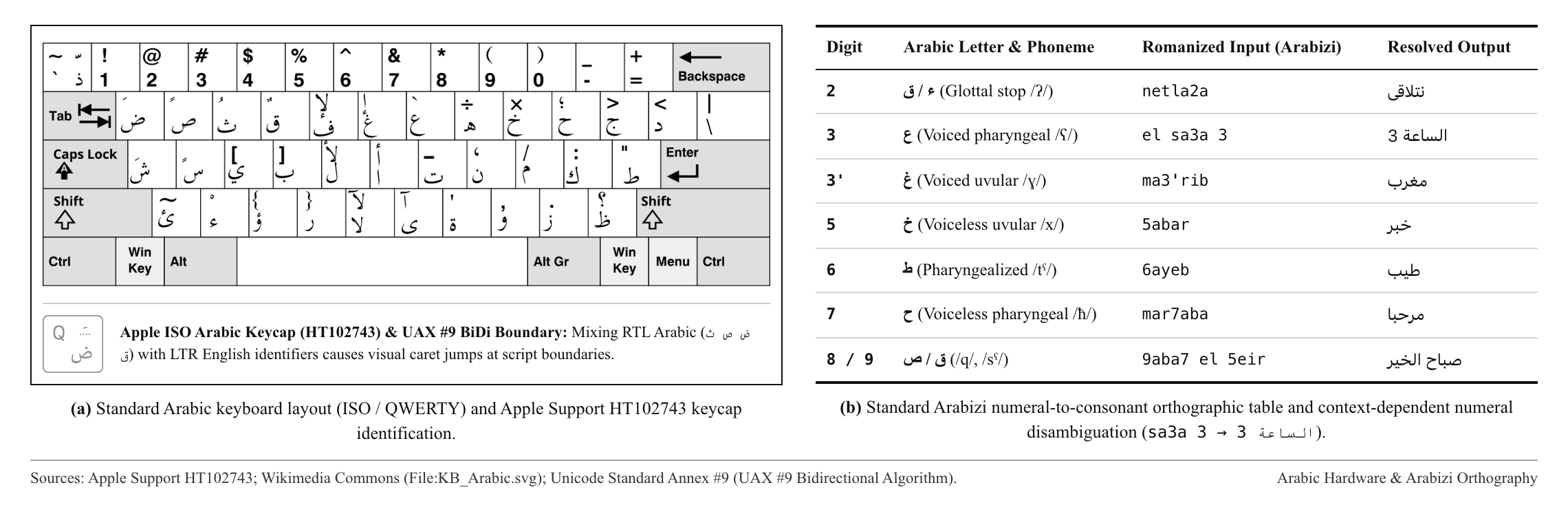
If you do not know the Arabic 101 keymap, macOS also includes "Arabic – QWERTY", which maps Arabic letters to similar-sounding English keys. However, it is Mac-only, cannot read chat numbers like 2, 3, 5, and 7, and still switches the text field into right-to-left (RTL) mode — causing the cursor to jump whenever you insert an English word.
Arabizi chat numerals (2, 3, 5, 7) and Yamli
Because the 26 English letters cannot cover Arabic throat and emphatic sounds like ع (‘ayn), ح (ḥā’), or ق (qāf), everyday Arabic chat uses numbers whose shapes mirror those Arabic letters. Since Microsoft retired its desktop Maren utility, browser boxes like Yamli let you type Arabizi in a web tab and copy-paste the Arabic script back into your app:
| Number | Letter | Example | Arabic |
|---|---|---|---|
| 2 | ء / أ / ق | netla2a / so2al | نتلاقى / سؤال |
| 3 | ع | sa3a / ba3d / 3asr | ساعة / بعد / عصر |
| 3' | غ | 3'ali / ma3'rib | غالي / مغرب |
| 5 | خ | 5abar / akhbarak | خبر / أخبارك |
| 6 / 7 | ط / ح | 6ayeb / mar7aba | طيب / مرحبا |
| 8 / 9 | ق / ص | 8ahwa / 9aba7 | قهوة / صباح |
Mixed Arabizi and English in one sentence
With UnimeType, you never flip between an RTL keyboard and an LTR keyboard while composing, and you never leave your app to copy-paste from a browser. You draft your entire thought from left to right on your standard English keyboard — "bokra netla2a el sa3a 7 fel cafe? ana ageeb dessert, wenta ekhtar el playlist." — and tap Convert once at the end.
Because UnimeType evaluates the whole sentence at once, word-internal numerals (netla2a, sa3a) turn into ء and ع, the standalone time 7 stays a digit, and intentional English words (cafe, dessert, playlist) stay in Latin script.
Common questions
Will UnimeType turn every number into an Arabic letter?
No. Digits like 2, 3, 5, and 7 only become Arabic letters when they sit inside an Arabizi word (like "sa3a" → ساعة). Standalone times and dates (like "7") stay numbers.
Does it work with Egyptian, Levantine, and Gulf dialects?
Yes. Common Levantine ("shu akhbarak", "bokra"), Egyptian ("ezayak", "3amel eh"), Gulf, and Modern Standard Arabic phrases convert naturally alongside English.