
How to Type Hindi on an English Keyboard Without Losing English Words
Almost nobody outside government publishing memorizes the 46-key InScript Devanagari hardware layout. On Mac, Windows, iPhone, and Android, typing Hindi on an English keyboard comes down to choosing between word-by-word phonetic IMEs (which hijack your spacebar on every English noun) and whole-sentence Hinglish conversion.
Three ways to type Devanagari on QWERTY hardware
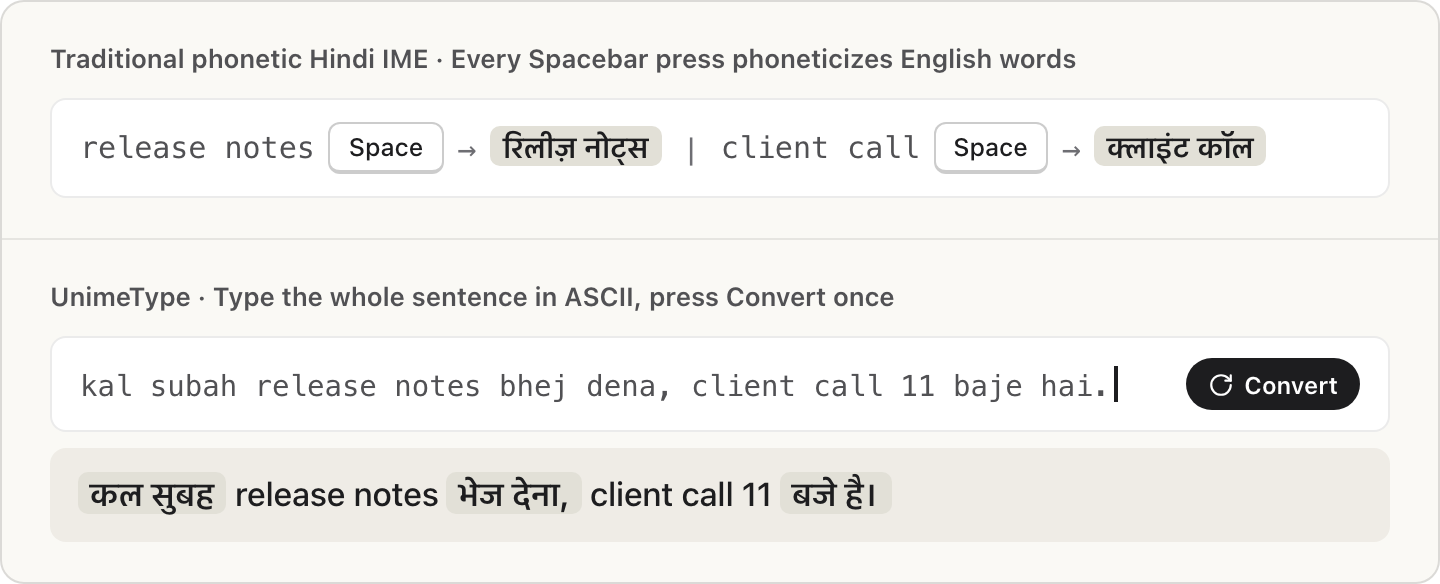
Built-in OS phonetic IMEs (macOS Hindi – Transliteration and Windows Hindi Phonetic) work offline for pure Hindi paragraphs, yet every Spacebar press commits the preceding word into phonetic Devanagari—turning "main gate" into "मैं गेट" unless you toggle modes mid-sentence, and breaking single-key English shortcuts when you click back into Figma, Excel, or a game.
The 46-key InScript layout rewards trained touch typists writing pure Devanagari all day, though it carries a steep memorization curve on unmarked English keycaps and still requires layout switching whenever you switch windows to an Excel sheet or Overleaf document.
UnimeType Convert keeps your keyboard in plain ASCII across every open app while drafting everyday Hinglish mixed with English words, then converts the sentence in one deliberate action—resolving "main" (मैं vs. main gate) from full-sentence context.
Solving homographs like "main" across WhatsApp, Figma, and Excel
In Hinglish, "main" means "I" (मैं)—identical in spelling to English "main gate" or "main lobby". Word-by-word phonetic keyboards cannot look ahead to see "main gate ke paas" versus "main abhi cab me hoon". Because UnimeType waits until you finish the draft and press Convert, both meanings coexist cleanly in the same sentence without switching layouts.
Common questions
Does Hinglish Convert distinguish Hindi "main" (मैं) from English "main gate"?
Yes. Because UnimeType reads the full sentence before converting, Hindi pronouns like "main" turn into मैं while English phrases like "main gate" or "Excel sheet" stay in Latin script.