I Tried Every Bilingual Keyboard on My Phone — Why Do I Still Have to Tap the Globe Key?
If your daily life runs in two languages that don't share the same writing system, your left thumb has a permanent reflex: halfway through a sentence, it is already reaching for the little Globe key in the bottom corner of your phone.
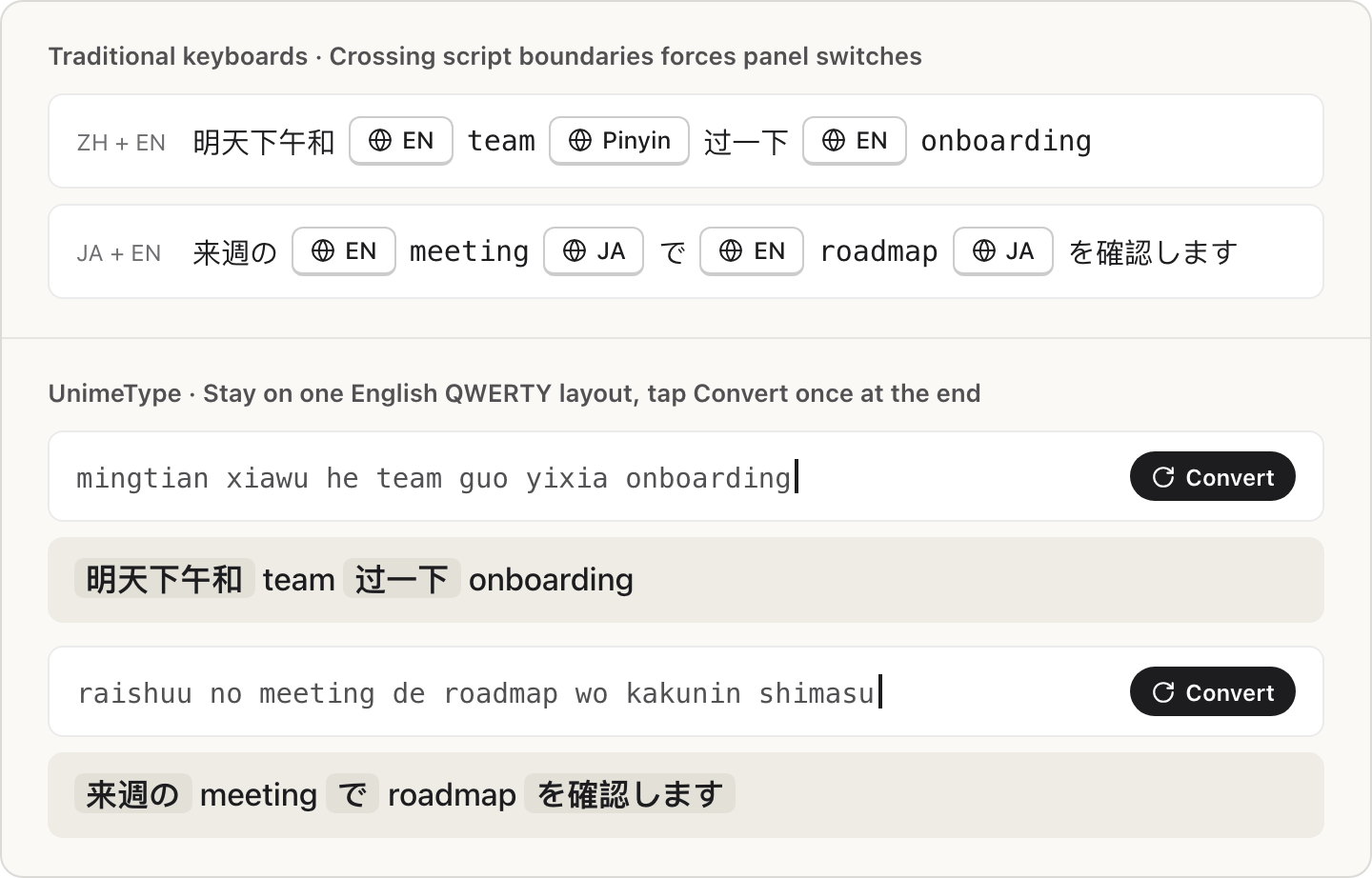
What puzzled me for years was watching Spanish-English and French-English friends text without ever touching that key. They leave Gboard or the stock iOS keyboard on a single screen, glide straight through a mixed sentence, and watch both languages fall neatly into place. Meanwhile, every time I replied to a teammate in Slack or WhatsApp with "明天下午和 team 过一下 onboarding" ("let's go over onboarding with the team tomorrow afternoon"), my thumb had to flip back and forth between the Pinyin panel and the English panel four times in ten words — and if I happened to have a second-language keyboard enabled for study, one extra tap on the Globe key threw me onto the wrong panel entirely.
After enough mangled replies, I installed every well-reviewed bilingual and multilingual keyboard I could find to see why none of them let me retire the Globe key.
Testing Gboard's multilingual typing, Microsoft SwiftKey, and Apple's built-in bilingual keyboard side by side makes the boundary clear right away: their "no-switch bilingual typing" works beautifully as long as both of your languages share the 26-letter Latin alphabet.
When you mix English with Spanish, French, or German, one QWERTY layout stays on screen the whole time and word-level probabilities decide whether cafe needs an acute accent. Within European Latin scripts, the Globe key genuinely disappears.
Step across a script boundary, though, and that unified experience vanishes. Whether your everyday bilingual pair is Chinese and English, Japanese and English, Arabic and English, or Hindi and English, mainstream keyboards immediately split your native language and English back into separate panels. Dropping two English product names or app shortcuts into a native sentence puts you right back on Globe-key duty.
Why can major keyboards merge English and French into one panel, yet wall off Chinese Pinyin, Japanese Romaji, and Arabizi even when users type them on the exact same 26 English keys?
The culprit isn't the keycap grid on the glass. It is the live candidate bar above it. Traditional input methods are built around immediate, keystroke-by-keystroke guessing: tap two or three letters and the bar has to commit to a script right now. If Pinyin (or Romaji) shared a live popup directly with English, typing ni or main in isolation would create an instant collision before the rest of your thought existed — is ni the Chinese character 你, the Japanese particle に, or the opening letters of night? Because a live bar has to guess before the sentence is written, traditional keyboards keep non-Latin scripts locked behind separate panels.
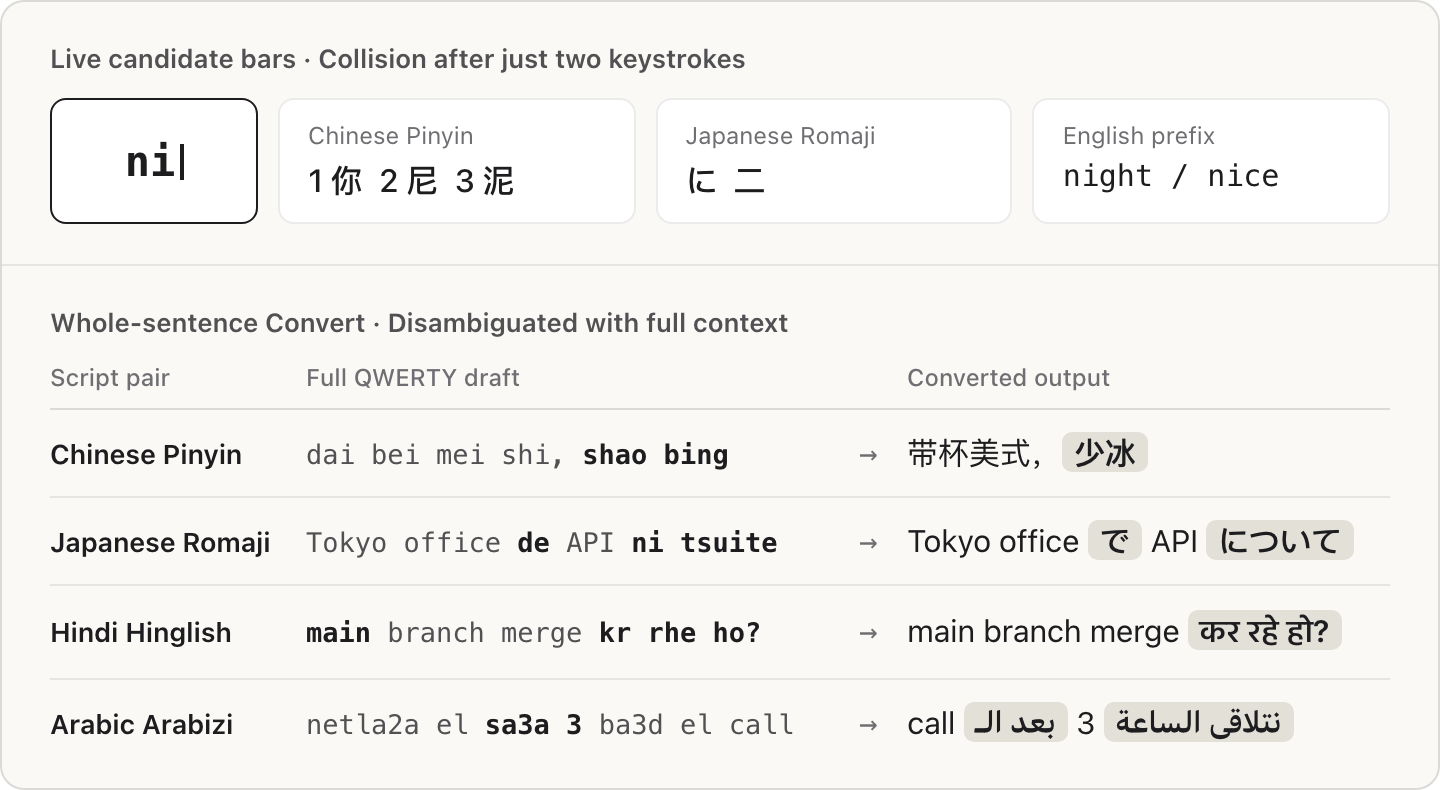
Seeing that structural tradeoff made me stop hunting for a hidden setting inside traditional keyboards. As long as candidate selection happens on every keystroke, cross-script bilingual typing will always need a panel switch.
The way out was separating typing the letters from converting the script. Now I keep one plain English QWERTY keyboard active on both my phone and my laptop. When I write mingtian xiawu he team guo yixia onboarding (or when a Japanese-English user writes raishuu no meeting de roadmap wo kakunin shimasu), I type the entire thought straight through in plain ASCII letters without a candidate bar jumping in — and on my laptop, switching back to Figma shortcuts or Excel formulas never collides with a leftover IME mode.
Once the full sentence is sitting in the text field, I tap UnimeType's Convert button once (see Input languages for supported bilingual script pairs). With the whole sentence visible at once, the model turns the phonetic words into native script in place while leaving team, onboarding, meeting, and roadmap untouched in English.
Locking my devices to a single English layout erased the constant micro-habit of glancing down to check which keyboard panel was armed before typing.
Gboard and built-in OS keyboards are still the right choice if your bilingual pair stays inside Latin scripts, or when a passage is packed with rare characters where picking from a live candidate list one by one helps (or when you are completely offline on a phone). Whenever your daily bilingual routine crosses scripts — mixing Chinese, Japanese, Arabic, Hindi, or Russian with English words and English-first apps — staying on one plain QWERTY panel and converting the finished sentence is the cleanest way to stop tapping the Globe key. You can try that setup directly on the bilingual keyboard guide.
Download UnimeTypeiOS, Android, macOS, Windows, Linux, and ChromeOS
View downloadsNext: Cloud LLMs Are Smarter With a Good Prompt. Why Did We Still Train 0.8B, 4B, and 9B Local Models?