
How to Type Russian on an English Keyboard (Translit & Phonetic Guide)
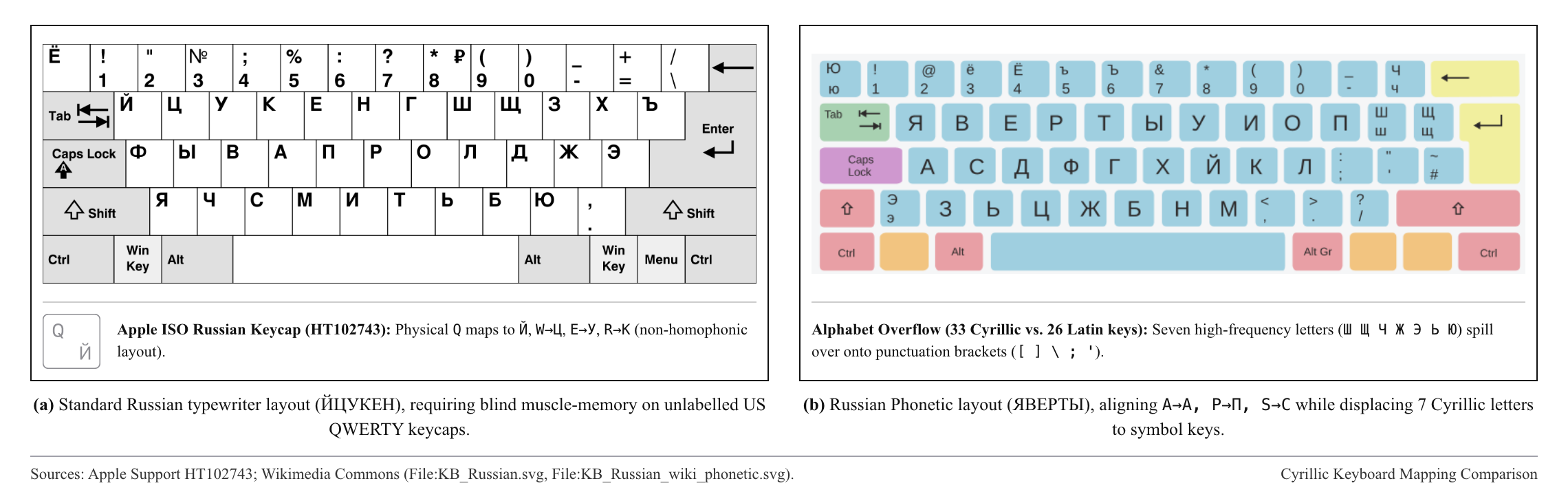
Standard Russian keyboards use the ЙЦУКЕН layout, where physical key C types Russian С (s) and H types Р (r). On an English keyboard, you can enable a built-in Phonetic layout in OS settings, use a zero-install browser translit converter, or type Russian translit (shch, zh, kh, ya) and English together and tap Convert once with UnimeType.
Phonetic Russian keyboards (ЯВЕРТЫ / Mnemonic)
If you do not touch-type on standard ЙЦУКЕН, both macOS and Windows include phonetic Russian layouts that map A to А and B to Б. On macOS, open System Settings → Keyboard → Input Sources → Edit → + → Russian and choose "Russian – Phonetic" (Apple Support). On Windows 11, open Settings → Time & language → Language & region → Russian → Keyboard and add "Russian - Mnemonic" (Microsoft Support).
Because Russian has 33 letters and English has 26, phonetic OS layouts have to hide Ш, Щ, Ж, Ч, Ы, Ь, and Ю under bracket, equals, and number keys — and you still have to switch layouts before typing an English word.
Browser translit converters (shch, zh, kh, ya)
Instead of hunting for bracket keys to type щ or ж, Russian translit uses familiar Latin letter pairs. When you need to convert a block of pure Russian text in a browser without installing software, use our free Translit to Cyrillic web tool or Translit.net:
| Cyrillic | Translit | Example |
|---|---|---|
| ж / х / ц | zh / kh / ts | zhal' → жаль, khorosho → хорошо, tsena → цена |
| ч / ш / щ | ch / sh / shch | seychas → сейчас, shkola → школа, borshch → борщ |
| ь / ъ | ' (soft) / '' (hard) | den' → день, pis'mo → письмо |
| ы vs. й | y (after consonant vs. vowel) | my → мы, ty → ты / moy → мой, chay → чай |
| я / ю / ё | ya / yu / yo | yabloko → яблоко, yug → юг, yolka → ёлка |
Mixed Russian translit and English in one sentence
Browser translit boxes blindly convert every Latin letter in the box, turning English words like "roadmap" or "coffee" into "роадмап" and "цоффее".
With UnimeType, you type the entire sentence directly inside Telegram, Slack, or WhatsApp on your standard English layout — like "v subbotu v 11 vstrechaemsya u metro? vozmu coffee i kruassany, potom v park!" or "my obsudili roadmap" — and tap Convert once. Russian words turn into properly spelled Cyrillic while "coffee" and "roadmap" stay in English.
Common questions
How is UnimeType different from macOS "Russian – Phonetic"?
A phonetic OS layout remaps keys one letter at a time, hiding Ш/Щ/Ж on bracket keys and forcing you to switch keyboards for every English word. UnimeType lets you type natural combinations like "shch" and "zh" alongside English words and converts the whole sentence in one tap.
When should I use the web tool vs. the UnimeType keyboard?
Use the web converter (/tools/translit-to-cyrillic) for quick pure-Russian text in a browser. Use UnimeType to convert mixed Russian and English directly inside Telegram, WhatsApp, or Slack.